Bookkeeping Automation for Accounting & Bookkeeping Firms

Our bookkeeping automation connects the software your clients run to QuickBooks, Xero or NetSuite, builds each import once, and keeps it running through every deadline.

Recent runs · this morning

6 runs · 259 transactions posted · 2 waiting on you, in 1 run

This morning’s runs across a firm’s clients, as the product lists them
ClientResult
Client 01Square → QuickBooks Online41 posted
Client 02Stripe → Xero12 posted
Client 03Payroll provider → QuickBooks Desktop1 posted
Client 04Google Sheets → QuickBooks Online118 posted
Client 05CSV export → NetSuiteNeeds review24 posted · 2 waiting on you · a customer not yet in NetSuite
Client 06Shopify → QuickBooks Online63 posted
The product’s run history for a firm’s clients. Sample client names, counts and times.

Whichever Books Your Client Keeps

We post into the accounting system your client already keeps. No migration, and no new software to learn.

  • QuickBooks Online
  • QuickBooks Desktop
  • Xero
  • Sage Intacct
  • Oracle NetSuite
  • FreshBooks
  • Zoho Books

What Is Bookkeeping Automation for an Accounting Firm?

Bookkeeping automation for an accounting or bookkeeping firm means the sales, payouts, invoices and payroll a client’s software produces reach that client’s books without anyone re-typing them. Autymate builds the import for each system a client runs, maps every field to the accounting system, holds back anything it is unsure about for your review, and runs it on a schedule. We build and run the connection. Your firm keeps professional judgement over what posts.

Build
the import for each system a client runs
Map
every field to the accounting system
Hold back
anything it is unsure about, for your review
Run
it on a schedule, and keep it running

Firms That Already Run This Way

Every figure below is published in full in the linked story, with the number the firm gave us.

Jitasa Group

Nonprofit accounting and bookkeeping, Boise

One QuickBooks Online connection across 350+ client files, read in real time for reconciliations and uncategorised transactions. Proof of the firm-wide shape, not of one import.

clients onboarded in 90 days, with four account managers and one customer success manager
150
Read the story

School of Bookkeeping

QuickBooks solution provider

A monthly affiliate-payout CSV mapped once, then imported into QuickBooks Online without being edited first.

errors on monthly invoice imports, and hundreds of hours a month returned
0
Read the story

GrowthForce

Outsourced bookkeeping and accounting, 160+ clients

A client’s weekly invoice details moved from a Google Sheet into QuickBooks Online.

hours a month returned on one client’s weekly invoicing, the published quote’s figure
40+
Read the story

Results shown are from featured customers and are not typical. Your results depend on your clients’ systems, volumes and how the work is set up.

Where the Hours Go in a Multi-Client Practice

The shape of the work is the same in every practice. Only the client’s software changes.

In most practices one person is the integration. A client’s point of sale, payment processor, payroll provider or job system produces the transactions. The export lands as a file. Someone reshapes the file, decides where each line belongs, keys it in or imports it, then chases whatever did not match. That work repeats every period, for every client, and it lands hardest in the week before a deadline.

The Spreadsheet Route
Getting transactions from another system into the books usually means an export, a spreadsheet, and an import that is fiddly and badly documented. The file has to be massaged before the accounting software will take it, and it has to be massaged again next month.
The Connection That Stops
A bank feed, a payment feed or an app link that was working stops. Each vendor points at the other. The practice falls back to downloading the file and keying it in, and the fallback quietly becomes the process.
The Import That Loses Something
A migration arrives incomplete, a standard report comes back empty, an opening balance will not tie. The practice absorbs the re-entry, and clean-up becomes a line of business rather than an exception.
The Twentieth Client
Below roughly twenty clients the constraint is finding them. About a quarter of firms surveyed are past that line, and there the constraint is hours: each new client arrives with a system, and someone builds its path into the books by hand.
spend too much time moving data between systems
35%
say their tools do not integrate well
31%
re-enter the same information at least a few times a week
67%
Financial Cents’ 2026 Bookkeeping Firm Tech Stack Report, 261 bookkeeping firms, February 2026, sponsored by Financial Cents. The 67% is 20% multiple times a day, 8% daily and 39% a few times a week.

Bookkeeping Automation Beyond Documents and Bank Feeds

Three things get called bookkeeping automation. This page is about the one that touches your clients’ software.

Bookkeeping gets automated in three places. Document capture reads receipts, bills and statements. Bank feeds bring in what the bank saw. Neither one touches the system a client runs the business on: the point of sale, the payment processor, the payroll run, the spreadsheet they will never give up. That is the data that never becomes a document, and it is the part that still arrives as an export and goes in by hand.

How Do You Automate Bookkeeping?

Start with the transactions that repeat. For each recurring flow, decide the source, the record it becomes in the books, and the account each line goes to. Then make that decision once and let it run: a document tool for paper, a bank feed for the bank, and a built connection for everything a client’s software produces. Keep a review step in front of the books, so nothing posts that a person has not seen.

How Do You Automate Data Entry Into QuickBooks?

Connect the system the transactions come from, map its fields to the fields QuickBooks Online, QuickBooks Desktop, Xero or NetSuite expects, check what it will write, then put the run on a schedule. From then on it runs on its own, every day at six, and anything it is unsure about waits for a person instead of landing somewhere plausible.

One row waits, and it says why

Connection
A system Autymate is allowed to read from or write to: your client’s till, their payment provider, their accounting software.
Automation
A standing instruction: take this kind of data from here, and put it there, on this schedule.
Run
One occasion when an automation did its job. Yesterday at 6am is one run; today at 6am is another.
Mapping
How each piece of information lines up: which column in the file becomes which field in the books.
Needs review
A transaction Autymate would not guess about, so it stopped. Nothing was posted for it, and it waits for you.

Waits for you · a transaction it would not guess about

Retire the Monthly CSV

The file your client’s system exports every month is a source, not a chore.

A recurring CSV or Excel file is a supported source, the same as a point of sale or a payment processor. You define the file’s structure, the record it becomes and the field mapping once. Every following period uses that saved mapping, so the file uploads without being cleaned up or rebuilt first. If the export changes shape, the affected field stops and tells you why, instead of posting something plausible.

Every month, today

  • Download the export from the client’s system
  • Fix the columns until the accounting software will take the file
  • Work out which account each line goes to
  • Import it, and hope the layout has not changed
  • Hunt for whatever did not match

Every month, once the import is built

  • Upload the file as it is
  • The saved mapping does the translating
  • Every row is shown as it would post
  • Posted, on the schedule you set
  • A column was renamed in the export

    Waits for you · the export changed shape, so one field stopped

How Do You Import Transactions Into QuickBooks Online?

Upload a formatted file that matches QuickBooks’ layout exactly, or post through the QuickBooks API. Our guide to importing a CSV into QuickBooks Online covers the file route, and our free CSV to QBO converter handles a one-off bank file. For a recurring import, Autymate maps it once and posts on your schedule.

Can You Import Transactions From Excel Into QuickBooks Desktop?

Not directly. QuickBooks Desktop imports lists from Excel, but transactions need an IIF file, a bank download file or a tool built on the Desktop SDK. Our free Excel to IIF converter handles a one-off file, and our QuickBooks Desktop integrations guide covers the rest. For a recurring file, Autymate maps it once and posts on your schedule.

Massaging one monthly CSV by hand, the firm’s own example, took 30 minutes to an hour. Read the story

“I download the CSV, upload it without manipulation, and the import happens auty-magically.”

Dan Delong, Chief Content Creator, School of Bookkeeping

When a Client’s Software Does Not Connect to QuickBooks

The published answers are export a file, switch the client’s software, or check the marketplace. There is a fourth.

When a client runs software with no QuickBooks integration, the usual advice is to export a file every month, to move the client onto different software, or to check whether the system is in the app marketplace. A firm does not control its client’s software choice. The fourth option is to have the connection built against that system’s API or its export, and then run for you, so the client keeps their software and the books stay current.

What Is the Best Way of Integrating Apps in Accounting Software?

Use a maintained marketplace app if one exists. If not, a generic automation tool moves simple records, but your firm runs it and fixes it. For anything due on a deadline, use a purpose-built connection that Autymate builds and runs. Our guide to data integration tools for accounting compares the options.

Which Accounting Software Integrates With the Most Apps?

Counting apps is the wrong test. QuickBooks Online, Xero and NetSuite each list hundreds of apps, so what matters is whether your client’s system is on the list, with the fields you need. When it is not, Autymate builds that connection. See our guide to integrated accounting software.

A marketplace app
When one exists and is maintained, use it.
A generic automation tool
Moves simple records. Your firm runs it, and your firm fixes it.
A built connection someone runs
For anything due on a deadline. Someone else runs it and repairs it.

GrowthForce

A GrowthForce client kept its weekly invoicing in a Google Sheet, which has no QuickBooks integration of its own, so Autymate built one into QuickBooks Online.

“We leveraged the Autymate platform to migrate weekly invoice details from a Google Sheet to our QuickBooks Online account, saving Growth Force and my team 40+ hours per month - 480 per year.”

Amber Perez Reyna, QuickBooks Specialist, GrowthForce
Read the story

Not a firm, but the same shape

A consulting business moved to a professional services system that had no QuickBooks integration, and its accounting team was creating invoices in QuickBooks Enterprise by hand, up to an hour a day. Autymate connected the two, mapped the customers, projects, invoices, time and expenses, and scheduled the run daily.

Read the story

Multi-Client Bookkeeping Automation, Set Up Once per System

The second client on Square, Stripe or a Google Sheet should not cost what the first one did.

A mapping built for one client becomes a template for the next client on the same system, so adding one takes minutes with a setup that already works. Each client keeps its own connection, its own run history and its own permissions, and you can pause one without touching the rest. A decision needed at one client is reported as that client’s, so a problem at one never becomes a problem at thirty.

  • Client 01SquareMapping built once
  • Client 02SquareReuses Client 01’s mapping
  • Client 03SquareReuses Client 01’s mapping
  • Client 04StripeMapping built once
  • Client 05StripeReuses Client 04’s mapping

    Waits for you · one run needs a decision, on one record

  • Client 06Google SheetsMapping built once

Jitasa Group

One QuickBooks Online connection across 350+ client files, and 150 clients onboarded in 90 days by a team of five.

Read the story

School of Bookkeeping

When a new affiliate came on board, the advanced mapping already set up was reused as it stood, so nobody rebuilt it.

Read the story

Every Run Monitored, Every Exception Handled

Credentials expire, exports change layout, a record is rejected. Each case is handled, and you are told which one.

When a connection can no longer run, its automations stop rather than post incorrectly. A record that cannot be posted cleanly is held for review instead of being written in part. You are told which client, which run and which record, the same day, not at month-end. The maintenance is ours: we built the connection, we monitor it, and we repair it when the source changes.

Nine situations a client connection meets, and how each one is handled.
SituationHow it is handled
A client’s authorisation expiresa password change, a reset, an expired tokenThe connection is marked as expired and its automations stop. You are notified. Once reconnected, the missed period is brought in as a catch-up from the last successful run.
The same record arrives twicea re-run, an overlapping run, a re-sent exportEach record is checked against its identifier before posting, so the second copy is skipped as a duplicate rather than becoming a double entry.
An export changes its layouta column renamed, misspelt or reorderedThe mapping is validated against the file before anything posts. The affected field is held and reported with the reason. The rest of the run proceeds.
The accounting system rejects a recorda closed period, a missing customer or account, a required field, a permissionThe record is held in a review queue with the reason. Correct the data, or have us correct the mapping, and the held records are retried. The rest of the run is unaffected.
A posting needs to be reversedan entry that should not have gone throughEvery posted figure traces back to the day and the run that created it. A run can be undone and reprocessed as a batch.
QuickBooks Desktop runs on a single machinethe company file lives on-premiseOur Desktop connection runs as a background service on the machine that holds the company file. Nothing has to move to the cloud first.
A client joins mid-year, or a connection was pauseda gap to fill before the schedule resumesHistorical pulls and batch catch-up start from the last successful point, so the gap is filled once and the schedule resumes.
The source is not final when the run is scheduledthe client’s day closes lateAn on-demand run refreshes the connection once the source is ready, without changing the mapping or the schedule.
A new client’s first runbefore anything is written to their booksThe first run is a preview from the client’s real rows, then a pilot on one client before the rest.

What Happens When a Connection to QuickBooks Stops Working?

If the client’s authorisation lapses, through a password change or an expired token, the connection is marked expired, its automations stop, and you are told at once rather than at the deadline. Once it is reconnected, the missed period is brought in from the last successful run, with each record checked against its identifier so nothing posts twice. If QuickBooks itself rejects a record, that row waits for review with the reason.

How Accurate Is Automated Bookkeeping?

As accurate as the review step in front of the books. Nothing is written to your client’s books until someone has seen what it would write. A row the run cannot place is held with its reason, and the rest of the run is unaffected. Every posted figure traces back to the run that created it, so an incorrect posting can be found and reversed rather than searched for.

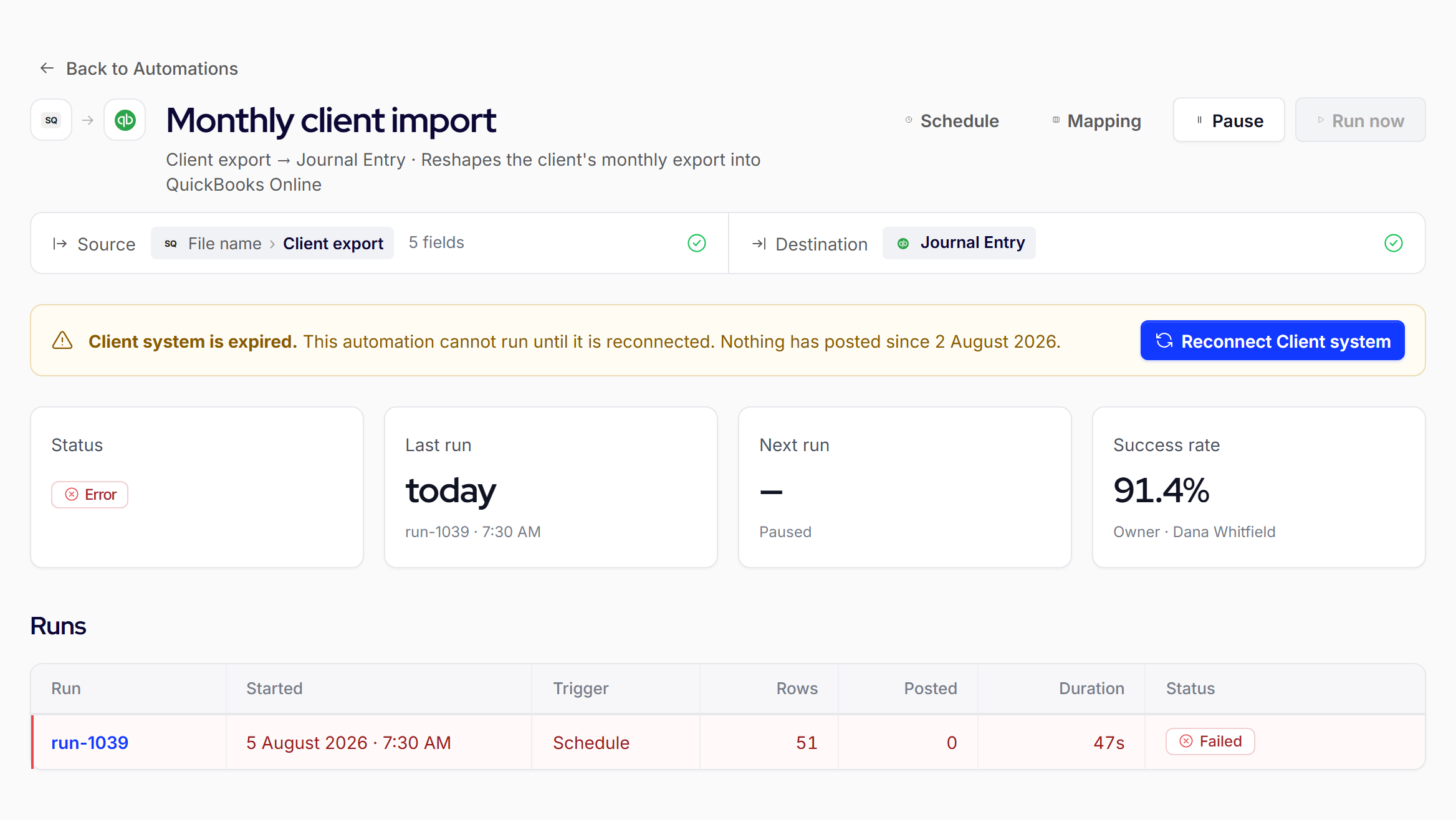
The product’s own notice for an expired connection: every automation that depends on it has stopped until it is reconnected, and nothing has posted since 2 August 2026. Sample client names, figures and dates.Ask us how each of these would be handled for the systems your clients actually run. We answer case by case, not in general.
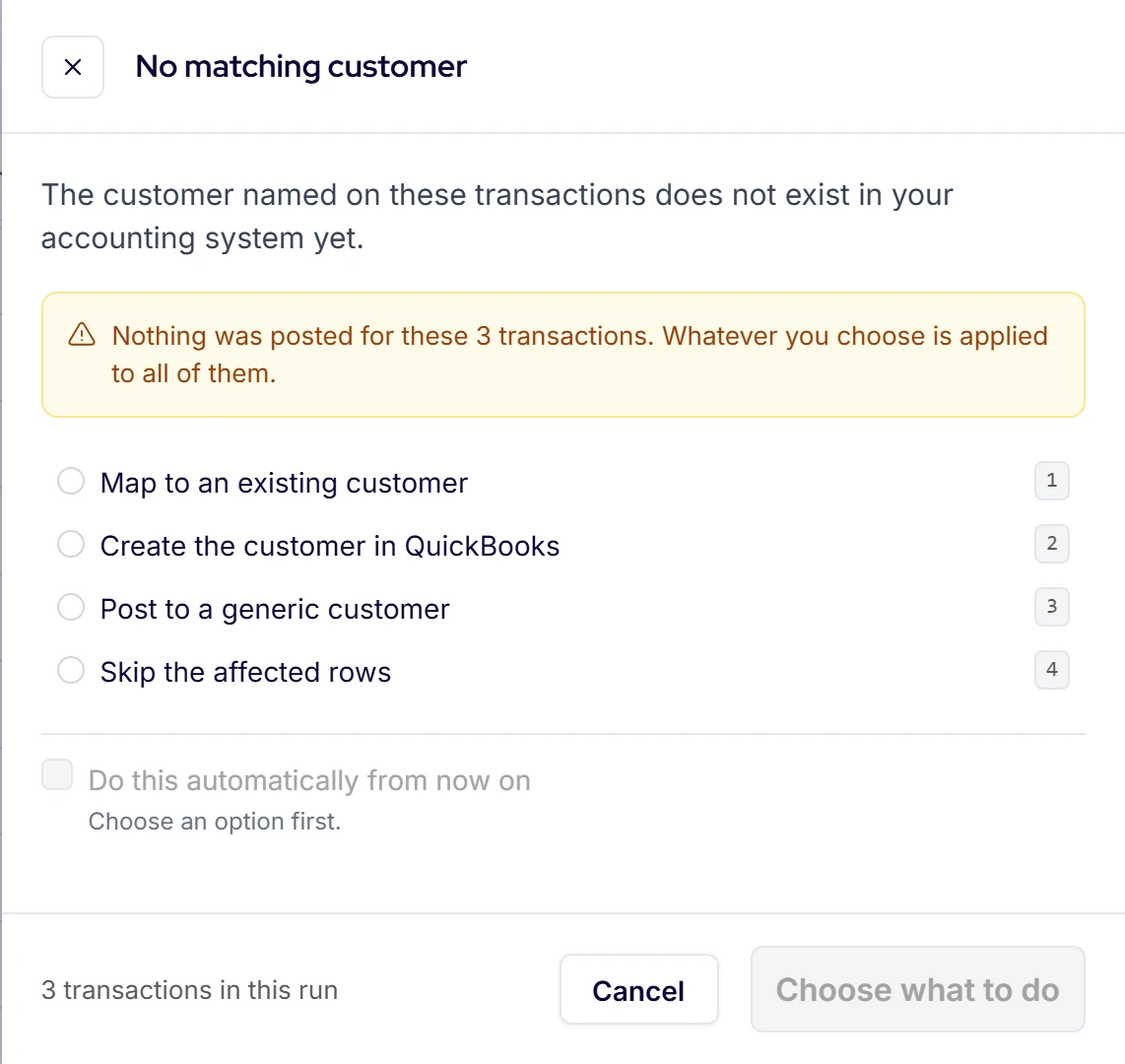
Autymate review panel headed No matching customer, listing the ways to resolve three held transactions.
The review screen for a held record. The customer named on these transactions does not exist in the accounting system yet, so nothing was posted for them, and whatever you choose is applied to all of them. Sample client names and figures.

What You See Before You Pay Us

A demo on your client’s real file, not a recording made on somebody else’s.

Bring one client, the one whose file costs you the most hours. We scope the connection against that client’s real export or system and say how hard it is before anything is built. You see a preview from the client’s real rows before anything is written, we pilot that one client, then we run it. Standard connections can show a first run the same day. A custom build is scoped and quoted first.

  1. Scope

    Your client’s real export, and our honest answer on how hard it is.

  2. Preview

    Every row as it would post, before anything is written.

  3. Pilot

    One client, one period, judged against your own numbers.

  4. Run

    Then the schedule, the watching and the fixing, ours.

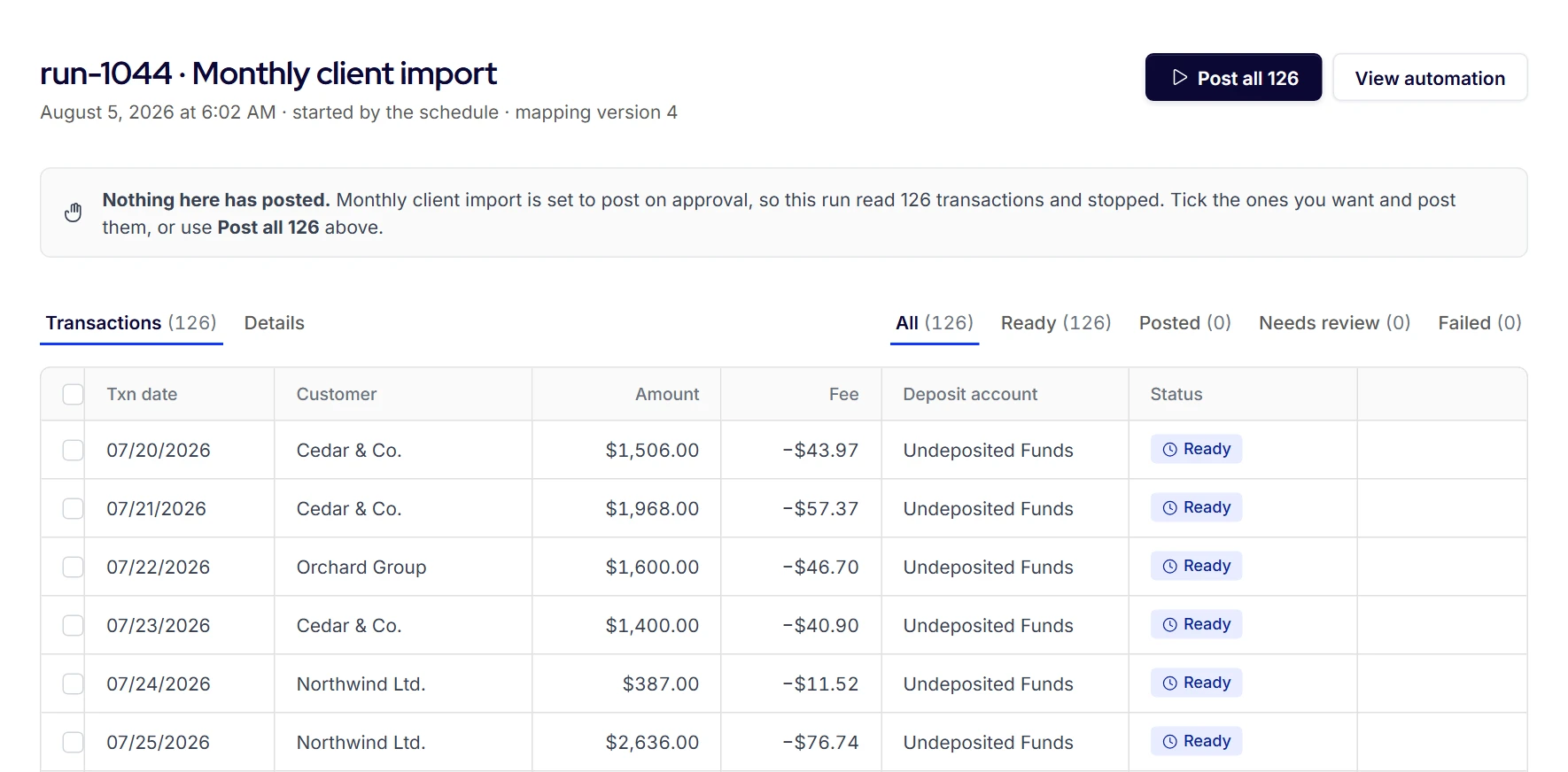
Autymate run screen with 126 transactions marked Ready and a notice that nothing has posted yet, beside a button to post them all.
Nothing here has posted. The run read 126 transactions and stopped, so you can check them and post the ones you want. Sample client names and figures.

What we show you is what ships today. We do not sell the roadmap.

What We Connect to Your Clients’ Books

Point of sale, payroll, payments, e-commerce, and the file a client already exports.

On the accounting side: QuickBooks Online, QuickBooks Desktop, Xero, Sage Intacct, NetSuite, FreshBooks and Zoho Books. On the client side: point of sale, payment processors, e-commerce, payroll, job and time systems, databases, and the recurring CSV, Excel or Google Sheets file a client already exports. The directory lists 300+ systems. Where one cannot be connected directly, a scheduled file from it is still a source, and where neither fits, we build against its API.

Point of sale and payments
Square
Stripe
PayPal
Authorize.net
E-commerce
Shopify
WooCommerce
Amazon Marketplace
eBay
Payroll and time
A payroll provider
TSheets
Harvest
Field and job
ServiceM8
Files and sheets
Google Sheets
Excel
CSV
An SFTP file drop
Databases
SQL Server
MySQL
PostgreSQL
Anything else
Any system with an API

Browse the 300+ systems in the directory. For a business rather than a firm, see accounting integration services for any business and QuickBooks integration services.

Where We Stop

We move the transactions. Your firm decides what they mean.

Autymate is a data-integration service, not a licensed accounting or financial advisory firm. We do not keep your clients’ books, we do not decide the accounts, the classes or the tax treatment, and we do not get between you and your client. The mapping applies rules your firm approved, the same way on every run. What the client is told, and what their books are taken to mean, stays with your professional judgement.

  • Your clients’ books stay yours

  • Accounts, classes and tax treatment are your call

  • Nothing between you and your client

Questions Firms Ask Before They Bring Us a Client

Yes. One mapping serves every client on the same system, while each client’s connection, run history and permissions stay separate. Pausing one client touches nothing else, and a held record is reported with the client and run it belongs to. Jitasa runs one QuickBooks Online connection across 350+ client files this way.

No. QuickBooks Online and Desktop are the deepest connections, and Autymate is an Intuit Gold Partner, but we post into whichever of the seven supported systems a client keeps, Xero, Sage Intacct and NetSuite among them. Nothing migrates and no new chart of accounts has to be agreed first. On the source side, anything with an API or a scheduled export can be connected.

Access is granted through each system’s own authorisation, so the client, or you on the client’s behalf, decides what Autymate may read and write, and it can be revoked at any time. Autymate is SOC 2 Type II attested. Whether sharing a client’s information with a third-party service needs the client’s consent under Section 7216 or your professional standards is a question for your firm and its counsel, and we will provide the documentation your review needs. See security and compliance.

Usually one thing: access. For a cloud system the client, or you on their behalf, authorises Autymate through that system’s own sign-in, and can revoke it at any time. In QuickBooks Online it then shows in the company’s list of connected apps. For a file, we need the export they already produce. For QuickBooks Desktop, the connection runs as a background service on the machine that holds the company file. How the client works day to day does not change.

Yes. This is the School of Bookkeeping story. The export does not have to match QuickBooks’ layout, because the mapping does the translating: which column becomes the customer, which value the account, which field the item. It is defined once against a real file, and from then on the file goes in as exported. A changed layout stops the affected field and says why.

The move itself is a migration project, and it is one we do: lists, balances and history re-mapped from the Desktop company file into the Online company. The part that surprises firms is what happens after: every connection that posted into Desktop has to be pointed at Online. Tell us before the move, not after, and the re-pointing is planned with the migration. See moving from QuickBooks Desktop to Online.

Some firms do, and it works until the first person leaves. A connection is not a project that finishes. Source systems change their APIs without asking, credentials expire, formats shift, and every one of those events lands on whoever built it. A firm that hires a developer has not bought an integration. It has taken on a second business with one employee and no cover. We build it, and then we are the ones it lands on.

For a system in the directory, connect it and the client’s books, and see a first run the same day. For a custom build against a system we have not connected before, scoping sets the timeline, because that is where what moves and what does not is settled. Weeks, not quarters, is typical for a single-system connection. What we need from your firm is access and one person who knows how the client’s file is structured.

Pricing is quoted per connection after scoping, because the cost depends on the system, the volume and how much of it is custom. Standard connections into your clients’ books are priced per set of books on the Autymate Transactions page. A custom build is quoted before anything is built. Whether the firm absorbs it or passes it to the client is your call. See Autymate Transactions.

Ask four things. Does it handle the transactions that never become a document, or only paper? Will it show you what it would post before it posts, on your own client’s file, not a clean sample? Who fixes it when the source changes, you or the vendor? And does it ship today, or is the part you need on a roadmap? Then run it on one client, for one period, against your current process, before you scale it.

A QuickBooks integration is a connection that moves records between another system and QuickBooks Online or QuickBooks Desktop through Intuit’s API or SDK, instead of through an export and an import. It can be a marketplace app, a generic automation tool, or a connection built and run for you. See how QuickBooks integration helps in automation.

Written By

Bryan Perdue, Founder and CEO of Autymate

Bryan Perdue · Founder & CEO, Autymate

Bryan founded Autymate after more than a decade building financial automation systems, and leads client engagement on the integrations the team ships. His focus is turning manual, multi-system workflows into low-code data integrations and custom applications for multi-location and financially sensitive businesses.

Updated .

Bring Us the Client You Dread

The one whose financials arrive at four o’clock on the deadline, in a format nothing will take.

Name the system and send one real export. You get an honest answer on how hard it is, a preview from your own rows, and a quote before anything is built.