Connect the Tools Your Agency Already Runs

Harvest, Asana, Google Ads, HubSpot, QuickBooks and Xero are all in our connection directory. We build the connections between them, and then we run them.

  • Time tracking

    • Harvest
    • Toggl
    • Everhour
  • Project work

    • Asana
    • monday.com
    • ClickUp
  • CRM

    • HubSpot
    • Salesforce
    • Pipedrive
  • Media buying

    • Google Ads
    • Facebook Ads
    • LinkedIn Ads
  • Accounting

    • QuickBooks
    • Xero
    • FreshBooks
  • Payments

    • Stripe
    • PayPal
    • Square

Keep Your Stack. We Connect It.

An agency’s systems are spread across categories that rarely share a vendor: hours, project work, pipeline, client media, payments and the general ledger. Every layer below is in our connection directory, checked against it on . The directory currently lists 334 systems, and anything exposing a REST API can be built.

The layers of an agency’s software stack, with the systems in each layer that are in the Autymate connection directory, verified 2026-08-19.
LayerSystems
Time trackingHarvest, Toggl, Everhour
Project and work managementAsana, ClickUp, monday.com, Teamwork, Basecamp, Wrike, Trello, Smartsheet
CRM and salesHubSpot, Pipedrive, Salesforce, Zoho CRM
Media buyingGoogle Ads, Facebook Ads, LinkedIn Ads
Accounting and general ledgerQuickBooks Online, QuickBooks Desktop, Xero, NetSuite, Sage, FreshBooks, Zoho Books
PaymentsStripe, PayPal, Square
Marketing, comms and storageMailChimp, Slack, Dropbox, Airtable, Google Workspace
Anything elseAny system with a REST API

Do I Have to Replace My Project Tool or My Accounting System?

No. Nothing here asks your team to move into a new platform. Your time tracker stays, your project tool stays, your CRM stays and your accounting system stays. What changes is that they stop keeping separate versions of the same client, the same job and the same invoice. If you swap one of them later, the connection is rebuilt against the new system rather than the whole reporting layer being rebuilt.

A Connection Carries What It Was Built to Carry

A native connection between two business systems moves the records it was built to move, and that is usually narrower than the marketing around it suggests. The gaps are rarely dramatic. They are a missing identifier, a cost rate that covers employees but not contractors, a fee posted on the settlement date instead of against the invoice it came from. Each gap is small on its own. Each one is why a person still finishes the job by hand.

What people expect a connection between two business systems to move, against what a native connection commonly moves.

What people expect a connection to move

What a native connection commonly moves

The whole record
The fields the connection was built for, most often the invoice and the customer
Hours, onto the job they were worked on
Frequently nothing. Time and billing sit on opposite sides of most native connections
A cost rate for everyone who works on a job
Employee cost rates are common. Contractor and subcontractor cost usually is not
One identifier that says which client this is
Each system keeps its own, and nothing forces them to match
Gross amounts you can tie back to an invoice
Payment processors settle net, with fees posted on the settlement date
A link from the deal to the invoice it produced
The link is often dropped at the boundary between the two systems
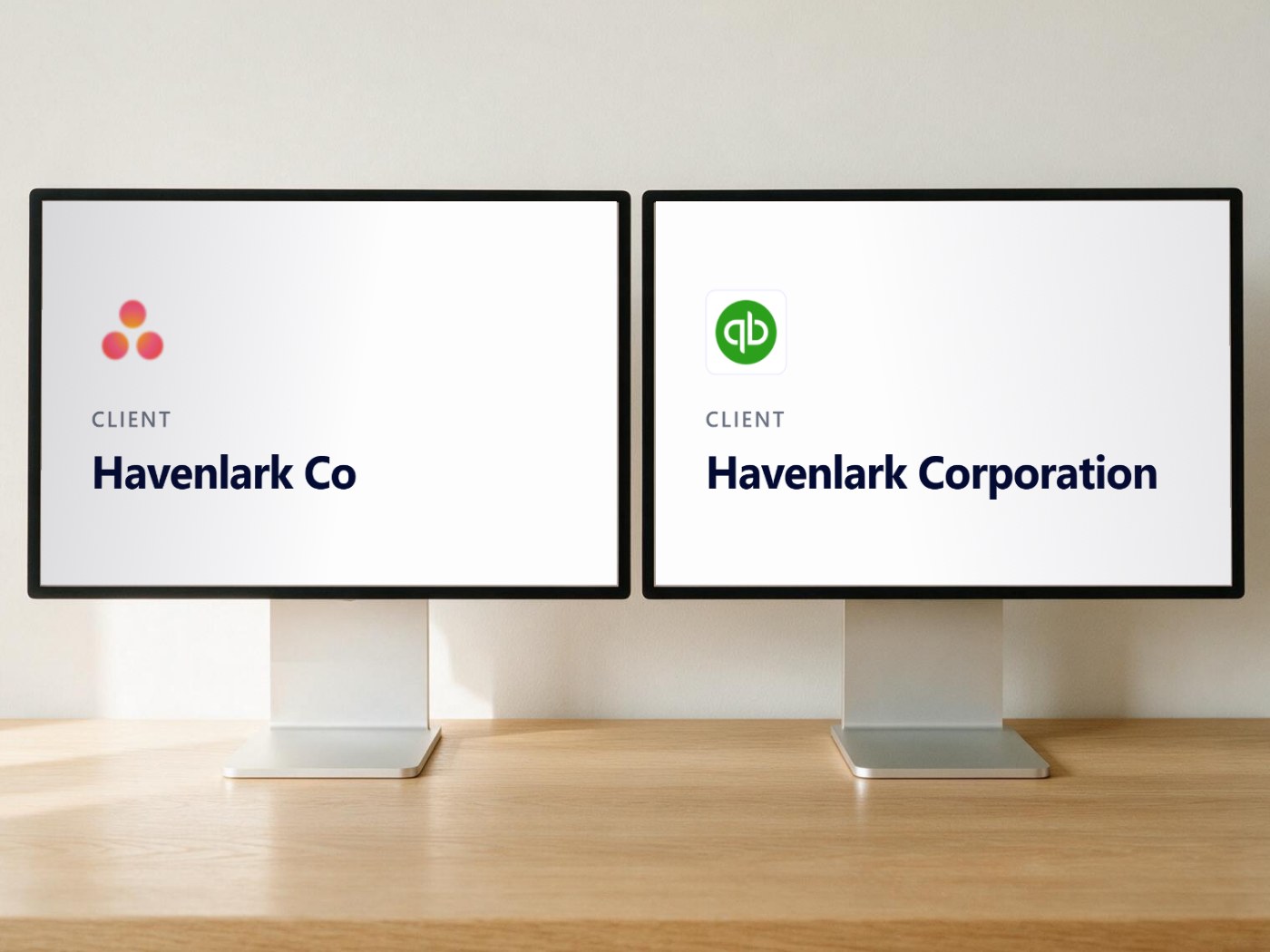
Two desktop monitors side by side on a wooden desk. The left screen shows the Asana logo above the client name Havenlark Co. The right screen shows the QuickBooks logo above the client name Havenlark Corporation. The same client, recorded under two different names.

Why Do Two Systems Disagree About the Same Client?

Because each system keeps its own record of who that client is, and nothing forces the two to agree. The same client can be Havenlark Co in your project tool, Havenlark Corporation in your accounting system and a numeric account ID in your CRM. Until one identity is agreed across all three, anything built on top of them has to be joined by a person who knows which is which. Agreeing that identity is most of the work.

How the Connection Gets Built

Scoping decides everything else, because it settles which systems, which records and which direction before any code is written. The engine handles what breaks integrations in practice: duplicate records, partial failures, historical loads and reversals. Sync status is visible per connection, with drill-down into what failed.

  1. Scope

    which systems, which records, which direction, and what “one client” means across all of them

  2. Map

    clients, projects and cost categories reconciled so the same job carries the same name everywhere

  3. Build

    we develop and test against your live systems

  4. Run

    we monitor and maintain it, including when a vendor changes an API

Deduplication
unique-identifier prefixing, so re-syncs do not create duplicate records
Incremental sync
only what changed moves, with historical refresh available for a full rebuild
Undo, redo and batch reprocessing
a bad batch is reversible instead of becoming a cleanup project
Validation, normalization and field mapping
data arrives in the shape the destination expects
Real-time and catch-up paths
webhooks for event-driven sync, REST for historical pulls, plus error recovery
A durable record of every sync
we keep an auditable history of what moved and when

Two Services Businesses With the Same Shape of Problem

Neither of these is a digital agency, and we are not going to imply otherwise.

We have not published a digital agency case study. We show these two because the shape is the same: a business that bills clients for its people’s time, with the effort recorded in one system and the money in another, and a person joining the two by hand.

Results shown are from featured customers and are not typical. Your results depend on the systems involved and how the work is scoped.

The Planet Group

A staffing firm. 800+ employees across seven operating brands.

payroll processing, down from two days
2 hours
redeployed off manual processing
2 FTE

The stated goal was straight-through processing across the whole order-to-cash loop, from the sale transaction to customer billing without human intervention. The four problems it set out to fix were data spread across multiple systems, manual tracking on spreadsheets and paper, data inaccuracy and the cleansing that follows it, and poor reporting. The shape of that list travels.

Read The Planet Group story


Jitasa

An accounting firm.

Jitasa’s problem was per-client visibility at roster scale: which accounts are healthy, which are drifting, and which account manager owns the answer. The client count is what changes between one services business and another. The reason a spreadsheet stops holding it does not.

What generalises is the pattern, not the industry. In both cases the front office stayed exactly where it was and a connection was added underneath it. Nobody changed the system their people work in to fix a reporting problem.

Questions Agencies Ask First

No.

Xero, NetSuite, Sage, FreshBooks and Zoho Books are all in the directory alongside QuickBooks Online and QuickBooks Desktop. We are an Intuit Gold Partner and QuickBooks is a strong destination, but it is one destination among more than three hundred systems. The accounting system you already run is the one we connect to.

Yes, and it is one of the more common things we are asked to connect.

Accounting systems usually carry cost rates for employees but not for subcontractors, so contractor invoices often arrive on their own and get coded by hand. Bringing them in against the same client and job identifiers your other records use is a mapping exercise, and mapping is the part we do.

Yes.

Google Ads, Facebook Ads and LinkedIn Ads are in the connection directory alongside the accounting systems, the CRMs and the project tools. If client media spend needs to arrive in your books already identified against the client and the job it belongs to, that is a connection and a mapping question rather than a reporting one.

Sometimes, and if a two-system, one-direction flow is all you need, that is often the right call.

Those platforms get harder where the work usually gets hard: matching the same client across systems that name it differently, replaying a batch that failed halfway, backfilling history, and keeping it working when a vendor changes an API. We build and run that part.

Quite possibly not, and it is worth saying so.

If moving to retainers, direct debit or saved cards removes the problem you had, that is a cheaper fix than any integration and you should take it. Connections earn their place further along, when you run several systems that each hold part of the answer and none of them agrees with the others.

Often, yes, and we would rather say so than sell you something early.

A small team on one accounting system and one project tool usually does not need a connection layer. It becomes worth doing when the number of systems holding part of the same record grows faster than the number of people who can hold it in their heads.

It is a scoping question rather than a no.

The directory covers 334 systems and anything exposing a REST API can be built, which is the majority of what we do rather than an exception to it. The honest answer at that point is whether the system's API supports the records you need moved, and that is something we can usually tell you quickly.

No.

We are not a bookkeeping firm, we do not keep your books and we do not close your month. We build and run the connections between the systems your books depend on, so whoever does own the books, your in-house controller, your CPA or your outsourced team, is working from data that arrived on its own rather than data somebody typed in from an export.

Weeks rather than quarters for a typical scope, and the variable is how many record types move in how many directions rather than how many systems are involved.

Scoping is the step that sets the timeline, because it settles what moves and what does not before development starts. A single mapping across two systems is a far shorter engagement than a full order-to-cash loop.

Tell Us Which Systems You Run

Send us the systems you use and which way the data needs to move, and we will tell you which connections already exist, what has to be mapped first, and what the work looks like. If you would rather look before you talk to anyone, the directory is open.

Page notices

Written by
Bryan Perdue, Founder and CEO of AutymateBryan Perdue on LinkedIn (opens in a new tab) · Founder & CEO, Autymate
Last reviewed

Results shown are from featured customers and are not typical. Neither customer shown on this page is a digital agency, and each says so where its results appear. Your results depend on the systems involved and how the work is scoped. We do not guarantee any specific outcome.

QuickBooks and Intuit are trademarks of Intuit Inc. Other names and marks are the trademarks of their respective owners, used to identify the systems we connect.