


Connect Every System Your Automotive Service Shops Run
Tekmetric, Shopmonkey, Shop-Ware or Mitchell 1 at the counter, connected to parts, payments, payroll and your books.
Built for
- Multi-shop auto repair
- Tire and service centers
- Quick lube chains
- Collision repair
- Car wash operators
- Automotive franchise systems


 Repair Orders
 Sales by Shop
 Parts InvoicesCost of Parts
 Flagged Hours
 Technician Pay
- Wash Memberships
 Wash Revenue
Connected overAPIFile exportSFTP

 SOC 2 Type II
Can You Integrate Auto Repair Shop Software With QuickBooks?
Yes, you can integrate Tekmetric, Shopmonkey, Shop-Ware, AutoLeap or Mitchell 1 with QuickBooks Online or Desktop, Xero or Sage Intacct using Autymate. Each shop's closed repair orders post to its books, one by one or as a daily summary, with parts, labor and fees on their own lines, and every record is checked first, so anything unsure waits for review. The same connections reach parts ordering, card payments and payroll, and 300+ other tools.
 Autymate on every line: fields mapped, each record checked, anything unsure held


 Tekmetric, Shopmonkey, Shop-Ware, AutoLeap, Mitchell 1, NAPA TRACS or another
Tekmetric API and the Other Shop Software Your Locations Run
The counter, the parts desk, payroll and the books each run their own software. Autymate connects them.
A Tekmetric API integration connects the shop management system to the other software a shop runs, so repair orders, parts, payments and hours move without re-keying. Autymate builds the same kind of connection for Shopmonkey, Shop-Ware, AutoLeap, Mitchell 1 and NAPA TRACS, over each system's API, a file export or SFTP. Every connection maps the fields both systems use and checks each record.
| Shop management | TekmetricShopmonkeyShop-WareAutoLeapMitchell 1NAPA TRACSProtractor ARI ARI |
|---|---|
| Parts ordering | PartsTechNAPA |
| Car wash POS | DRB |
| Customer messaging |  Podium Podium |
| Payments |  Stripe Stripe Square Square |
| Payroll | Gusto ADP ADP Paychex Paychex |
| Accounting | QuickBooks OnlineQuickBooks DesktopXero Sage Intacct Sage Intacct Oracle NetSuite Oracle NetSuite |
- APILive data from systems that publish one
- File exportScheduled CSV or spreadsheet exports
- SFTPFiles dropped and picked up securely
Autymate builds and maintains the integrations between these systems. It isn't shop management software, a parts catalog or a payroll service, so the service writers, the parts desk and your accountant keep the tools they know. If a system isn't listed, Autymate builds the integration wherever it offers an API, a file export or SFTP.
Building shop software of your own? See integrations for software companies
Parts Orders Matched to the Repair Order and Your Cost of Goods
Parts arrive on a supplier invoice. The books need each part's cost on the job it went into.
Shop management systems order parts through PartsTech or straight from suppliers such as NAPA, and the supplier invoice arrives on its own. Autymate matches each supplier invoice to the repair order the parts were bought for, posts the cost of parts to cost of goods sold for that shop and records the bill for the parts vendor. An invoice that doesn't match the quote waits for review.
RO 48213 · Eastside · front brake jobParts from
- NAPA$64.80Front brake padsquoted $64.80Posted
- PartsTech$118.40Front rotors × 2quoted $118.40Posted
- PartsTech$56.30Wheel speed sensorquoted $42.10Held for review
Wheel speed sensor invoiced $14.20 above the quote: held for review
Cost of parts posted to RO 48213$183.20
Core charges travel with the part: the deposit the supplier charges on a rebuildable part and the credit when the old core goes back each land where your accountant's mapping puts them, instead of disappearing into parts cost.
End-of-Day Close: Card Payments, Fees and Deposits Tied to Every Repair Order
The processor pays out one deposit. The books need every repair order, fee and refund behind it.
Integrated payment processing for auto repair shops means the card batch, the repair orders it paid for and the deposit all agree. Autymate reads the day's closed repair orders from the shop management system and the batch from your processor, then posts sales, refunds and processing fees on their own lines with the net matched to the bank deposit, shop by shop. A batch that doesn't match waits for review.
How does end-of-day close work with the integration?
When a shop closes out for the day, Autymate posts that day's closed repair orders to the books, then matches the card batch to the deposit that lands a day or two later, after fees. Fleet charges billed to an account post to accounts receivable instead of waiting on a deposit. If the batch and the deposit differ, the difference waits for review with the amount and the reason.
Card batches fromStripeSquareor your processor
| 14 repair orders paid by card | $6,842.10 | |
| Refund | −$85.00 | |
| Processing fees | −$171.05 | |
| Bank deposit | Matched | $6,586.05 |
|---|
Ties out
Fleet account charges of $1,120.00 posted to accounts receivable
Illustrative figures for one shop's day.
Book the deposit as revenue and Thursday looks $256.05 smaller than it was, with no record of the fees. Across several shops and a month of batches, that gap is what a bookkeeper rebuilds from card slips.
Flat-Rate Technician Hours Sent to Payroll, Shop by Shop
The shop management system knows every flagged hour. Payroll shouldn't need someone to add them up.
Shop management systems track the hours each technician flags on every repair order. Autymate sends each technician's flagged hours, warranty time and spiffs to Gusto, ADP or Paychex as pay lines for the shop where the work was done, at the pay rates your shop sets. A technician with no rate for a labor type waits for review instead of being paid a guessed amount.
J. Ortiz · Eastside · week 40 Shop software
- 41.5 flagged hours × $32.00
- 6.0 diagnostic hours × $32.00
- Warranty job, 4.2 hours × $32.00
- Tire sales spiff
Also this week: 4.0 flagged hours at Northgate × $32.00
Pay lines Payroll service
- Flagged hours · Eastside$1,328.00
- Diagnostic hours · Eastside$192.00
- Warranty hours · Eastside$134.40
- Spiff · Eastside$45.00
- To Gusto$1,699.40
Northgate shop$128.00
When a technician covers a shift at another shop, those hours land with the shop that ran the repair order, so labor cost sits with the right shop in the books as well as in payroll.
QuickBooks for Auto Repair Shops, With Parts and Labor on Their Own Lines
Parts, labor, shop supplies and fees should land in the same accounts at every shop.
QuickBooks for an auto repair shop works when parts, labor and fees each post to their own account. Autymate posts closed repair orders from the shop management system into QuickBooks Online, QuickBooks Desktop, Xero, Sage Intacct or NetSuite with parts sales, labor sales, shop supplies, sublet and sales tax on separate lines, and cost of parts against the job. Whichever accounting software your shops run, every shop posts to the same accounts.
Posts to the accounting system you run
- QuickBooks Online
- QuickBooks Desktop
- Xero
- Sage Intacct
- Oracle NetSuite
| What comes in | Where it usually lands | Why |
|---|---|---|
| Parts sales | Parts revenue, by shop | Parts and labor margins stay separate |
| Labor sales | Labor revenue, by shop | Technician time is what the shop sells, so it shows on its own |
| Sublet repairs | Sublet revenue, with the sublet bill as its cost | Work sent out shows its own margin |
| Shop supplies and hazmat fees | Shop supplies income | Small fees stay visible instead of inside labor |
| Tire disposal fees | Fee income, or a liability where the state collects it | A fee collected for a state program isn't revenue |
| Core charges and core returns | A core deposit until the old part goes back | The credit offsets the charge |
| Fleet and warranty work | Accounts receivable, by account | Billed work isn't cash until it's paid |
| Discounts and comebacks | Against the revenue they reduce | Revenue isn't overstated |
| Sales tax | Sales tax payable, by state rules (parts taxed, labor often not) | The return matches what was collected |
| Cost of parts | Cost of goods sold, matched to the repair order | Every job shows its true margin |
| Card processing fees | Merchant fees expense | The deposit ties out to the sales |
Two ways to post. Your accountant chooses.
- Every repair order in detailEach repair order posts as its own sale, with parts, labor, fees and tax on their lines.
- One daily summary per shopThe day's totals post as one entry per shop, with the repair order detail kept in the shop software.
That is what shops want from automotive bookkeeping software: once your accountant approves the mapping, every shop posts the same way, and month-end starts from books already tied to the deposits. Shops on Tekmetric, Shopmonkey or NAPA TRACS post to the same accounts as shops on Mitchell 1 or Shop-Ware.
QuickBooks Online integration Accounting integration services
Car Wash POS and Unlimited Wash Memberships, Posted to the Books
Memberships, single washes and gift cards arrive as one deposit. The books need them apart.
A car wash POS QuickBooks integration from Autymate posts each site's day from DRB or your wash POS by type: single washes and upgrades, membership charges, fleet accounts and gift cards. Membership charges land as membership revenue, annual plans are held as deferred revenue and released month by month, gift cards stay a liability until they're redeemed, and the card batch is matched to the bank deposit after fees, refunds and chargebacks.
Parkway wash · SaturdayDay's total by type $6,714.00
- Membership charges$3,960.00
- Single washes and upgrades$2,184.00
- Fleet accounts$420.00
- Gift cards sold$150.00
Membership charges, $3,960.00
Illustrative figures for one wash site's day.
Rewashes and comped washes go on their own line, so they stay a number someone manages. Fleet accounts post to accounts receivable by account instead of waiting on a deposit, and a wash platform that is matched to the bank every day doesn't drift from it by month-end.
Accounting for Multi-Location Auto Repair Shops, One Mapping for Every Shop
Each owner group or franchisee keeps its own books. Every shop posts on the same approved mapping.
Accounting for multi-location auto repair shops starts with structure: each shop is a class or location inside one QuickBooks company, or its own company when the owners differ. Autymate posts every shop's repair orders, card deposits and technician pay to the right company and location on one approved mapping, so a group with six shops and a shop that opened last month post the same way.
- Owner group AQuickBooks Online companyEastsideNorthgateRiverside
- Owner group BQuickBooks Online companySouthgateLakeview
- Franchisee CQuickBooks Desktop fileHillcrest
A new shop starts on the same mapping the day it opens, and an acquired shop can keep its shop management system while its numbers post like the rest. For franchise systems in other industries, see franchise and multi-location integrations.
See What Posted at Every Shop, Before Your Bookkeeper Asks
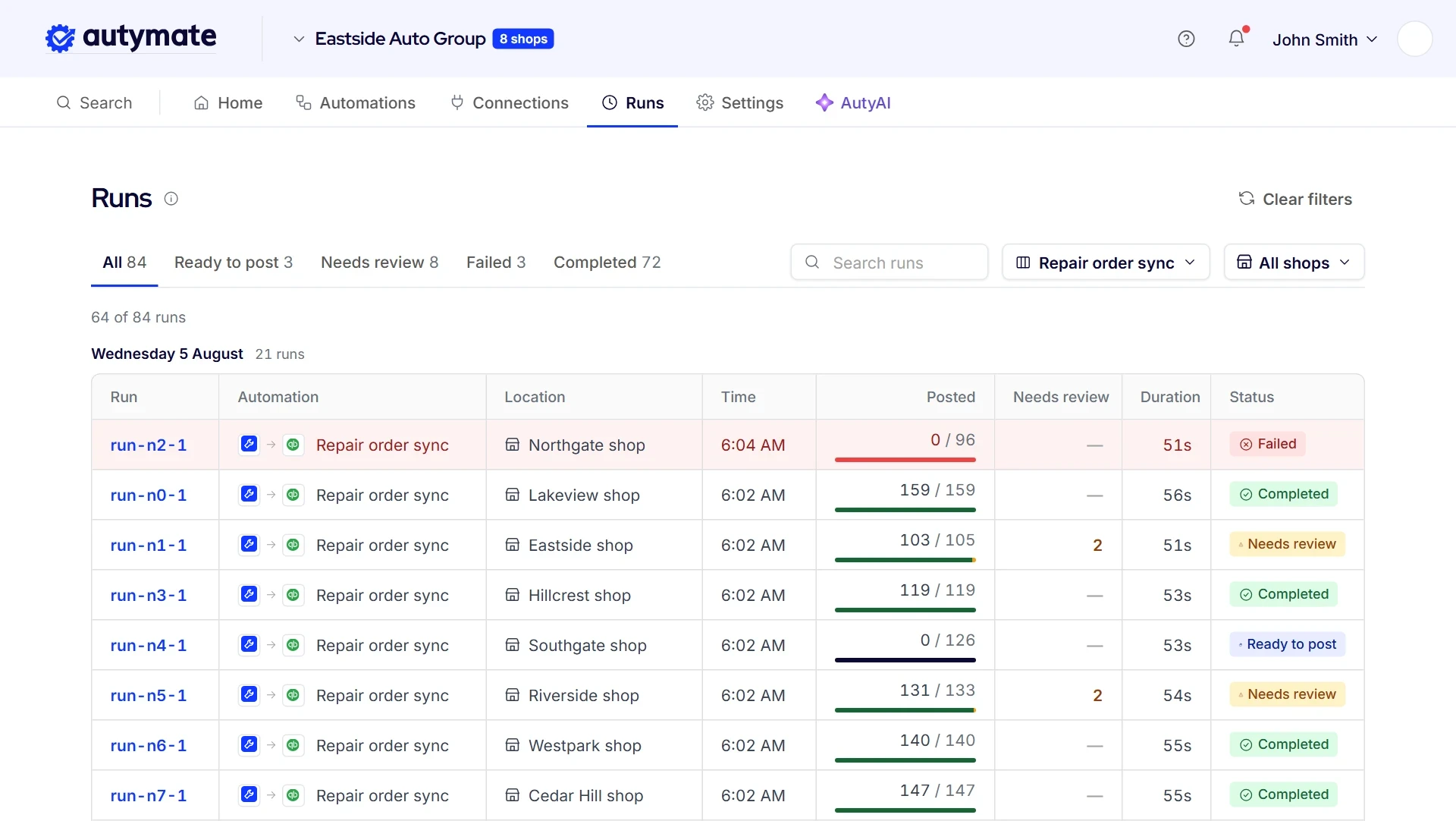
Nothing reaches the books or payroll until it has been checked. Each run is listed on its own, by shop and by system, with what posted, what is waiting and why. An invoice number already in QuickBooks, a card batch short of its deposit or a labor type with no mapping waits in review with the reason in plain language, and the rest of the run carries on.
- Each shop's runs listed separately
- What posted, what is waiting and why
- Plain-language reasons for anything held
- Duplicate invoice numbers held, not posted twice
- Queued and retried runs shown
This is the question a multi-shop owner asks first: did yesterday actually post at every shop? Every run shows its result, so a bookkeeper or office manager can check repair orders, deposits and pay without opening each system. Queued and retried runs show there too.
Automotive Integration Questions
Yes, you can connect Tekmetric to QuickBooks Online or QuickBooks Desktop using Autymate.
Closed repair orders post to that shop's books, one by one or as a daily summary, with parts, labor, fees and sales tax on the lines your accountant approved, and card batches are matched to deposits. The same mapping covers every shop, and the same connections can reach PartsTech, payroll and the other systems your shops run.
Not for the integration.
Autymate connects both QuickBooks Desktop and QuickBooks Online, so a shop on Desktop today posts the same way as a shop on Online. If you move a shop to QuickBooks Online, the approved mapping moves with it, and the shop management system and your other connections stay as they are.
Usually the one your accountant already knows.
QuickBooks Online and QuickBooks Desktop are widely used in auto repair, and Xero, Sage Intacct and NetSuite suit groups with other needs. Autymate connects all of them, so the choice can follow your accountant and your growth rather than your shop software. What matters more is that parts, labor, fees and sales tax post to their own accounts at every shop.
No.
Each shop keeps the shop management system it already runs, and the service writers keep working the way they do today. Autymate connects each one to your accounting system, parts ordering and payroll on the mapping you approve, so their numbers post to the same accounts. That matters most after an acquisition, when a new shop arrives with software of its own.
For one shop sending sales to one QuickBooks file, the built-in option can be enough.
Autymate adds the mapping your accountant approves, a check on every record before it posts, such as an invoice number already in QuickBooks, and the same rules across every shop and both QuickBooks Online and Desktop, plus parts ordering, payroll and your other systems. Every run is listed, so you can see what moved.
Autymate holds a SOC 2 Type II report, and each connection uses only the fields the approved mapping needs: repair order totals, parts and labor lines and payments for the books, for example, or flagged hours for payroll.
You approve each connection before it runs and can pause one shop without touching the rest. Every run is logged, so you can see exactly what moved.
Yes.
Each franchisee's shops post to that franchisee's own books on the same approved mapping, so every location's numbers land in the same accounts while franchisees keep their own logins. A new franchisee starts on that mapping the day the shop opens. The franchisor keeps its own books, and its side is covered on the franchise and multi-location integrations page.
Yes.
Your bookkeeper or CPA still owns the books, approves the mapping and closes the month. What changes is where they start: repair orders, deposits and technician pay arrive already posted by shop, with anything unusual held for them instead of buried inside a deposit. The hours spent matching card slips to deposits go to the questions only they can answer.
A Repair Order From the Bay to the Books, Nothing Re-Keyed
From the parts invoice to the bank deposit, Autymate moves each record to the next system and checks it first.
Front brake job, RO 48213 at the Eastside shop: Tekmetric to QuickBooks Online
Parts
The supplier invoices for RO 48213 are matched to the job.
ReplacesMatching supplier invoices to jobs by hand
Check
A sensor invoiced $14.20 above its quote waits for review.
ReplacesFinding supplier overcharges at month-end
Close
The closed repair order is read from the shop software, with parts, labor and fees on their own lines.
ReplacesRe-keying repair orders into QuickBooks
Pay
The technician's flagged hours go to Gusto for the Eastside shop.
ReplacesAdding up flag sheets for payroll
Post
The repair order posts to QuickBooks, and the card batch matches the $6,586.05 deposit.
ReplacesTying card slips to bank deposits
The same flow at every shop
- Eastside
- Northgate
- Riverside
- Southgate
- Your shops
Page notices
The examples on this page are illustrations. The shop, repair order, parts, deposit, technician and car wash figures show how the data moves; they are not customer data, and results depend on your own systems and setup. The mapping table is a starting point for your accountant, not tax advice.
QuickBooks and Intuit are trademarks of Intuit Inc. Tekmetric, Shopmonkey, Shop-Ware, AutoLeap, Mitchell 1, NAPA TRACS, Protractor, ARI, PartsTech, NAPA, DRB, Podium, Stripe, Square, Gusto, ADP, Paychex, Xero, Sage Intacct, Oracle NetSuite and the other names on this page are trademarks of their respective owners, used to identify the systems auto shops and car washes run. No endorsement or partnership is implied.