


Connect Every System Your Retail Stores Run
Lightspeed, Square, Shopify POS or Counterpoint at the counter, connected to your online store, ERP, CRM, payroll and books.
Built for
- Multi-store retailers
- Specialty retail chains
- Retail franchise systems
- Franchisees with several stores
- Stores that also sell online
 Autymate posts daily sales for 2,500+ The UPS Store locations
 Stock Counts
 Online Stock
 Receipts
 Customer Profiles
 Store Sales
 Sales Invoices
 Daily Sales
 Sales by Store
Connected overAPIFile exportSFTP

- Capterra 5.0 (86 reviews)
 SOC 2 Type II
Can a Multi-Store Retailer Integrate Its Online Store, ERP, CRM, Payroll and Books?
Yes, you can integrate Shopify or BigCommerce, Sage or NetSuite, Klaviyo or Salesforce, your payroll service and QuickBooks or Xero with the Lightspeed, Square, Shopify POS, KORONA or Counterpoint system at each store using Autymate. Autymate already posts daily sales for 2,500+ The UPS Store locations. Each connection maps the fields both systems use and checks every record before it moves, and anything unsure waits for review. It works with 300+ other tools.
 Autymate on every line: fields mapped, each record checked, anything unsure held
 Lightspeed, Square, Shopify POS, KORONA, Counterpoint or another
Retail Technology Integration for the Systems Your Stores Run
The counter, the online store, the ERP, marketing, payroll and the books each run their own software. Autymate connects them.
Retail technology integration connects the software each part of a store runs, so sales, stock and customers move without re-keying. Autymate builds those connections between Lightspeed, Square, Shopify POS, KORONA or NCR Counterpoint at the counter and the online store, ERP, CRM, payroll and accounting systems behind them, over each system's API, a file export or SFTP. Every connection maps the fields both systems use and checks each record.
| POS at the counter | Lightspeed RetailSquareShopify POSKORONA POSNCR Counterpoint Retail Pro Retail Pro Heartland RetailErply Heartland RetailErply |
|---|---|
| Online store | Shopify BigCommerce BigCommerce WooCommerce WooCommerce AmazonAdobe Commerce AmazonAdobe Commerce |
| ERP | Sage IntacctSage X3 Oracle NetSuite Oracle NetSuite Microsoft Dynamics 365 Microsoft Dynamics 365 Acumatica Acumatica |
| Inventory and purchasing |  Cin7 Cin7 Fishbowl Fishbowl |
| CRM, email and loyalty | Klaviyo Mailchimp Mailchimp HubSpot HubSpot Salesforce Salesforce Attentive Attentive Yotpo Yotpo Smile.io Smile.io LoyaltyLion LoyaltyLion |
| Payroll and scheduling |  Gusto Gusto ADP ADP Paychex Paychex Homebase Homebase Deputy Deputy |
| Accounting | QuickBooks OnlineQuickBooks Desktop XeroSage IntacctOracle NetSuite XeroSage IntacctOracle NetSuite |
- APILive data from systems that publish one
- File exportScheduled CSV or spreadsheet exports
- SFTPFiles dropped and picked up securely
Autymate builds and maintains the integrations between these systems. It isn't a POS, an online store, an ERP or an accounting system, so each store, the marketing team and your accountant keep the tools they know. If a system isn't listed, Autymate builds the integration wherever it offers an API, a file export or SFTP.
Running a retail franchise system? See franchise and multi-location integrations
Lightspeed Shopify Integration, and the Same Stock In Store and Online
A sale at the counter and an order online should draw on the same shelf.
A Lightspeed Shopify integration from Autymate sends products, prices and stock counts from each store to the online store and brings every online order back to the store that fulfils it, so a linen throw sold online is counted once. Square and Shopify work together the same way, and so do NCR Counterpoint, Magento or Amazon. An order that arrives twice waits for review instead of being counted twice.
- 1ShopifyOrder placed online#1187 · 1 linen throw · $68.00
- 2AutymateRouted to MidtownThe nearest store with stock
- 3Lightspeed RetailPicked at MidtownMidtown's count 3 → 2
- 4ShopifyOnline stock updatedOnline shows 16 → 15
- 5QuickBooks OnlineRecorded onceAn online sale, fulfilled by Midtown
The same order arriving twice from a retry: held for review, not counted twice
A store's own connector can move one catalog to one online store. The work starts with several stores: which one fulfils an order, how much stock the online store may sell, and how an online return comes back through a store's register. Autymate maps those rules once and applies them at every store. For how a register and an online store share one catalog, see POS and ecommerce integration.
SquareNCR CounterpointBigCommerceAmazon
Sage Ecommerce Integration, and the Other ERPs Retailers Run
When the ERP keeps the books, every store and the online store feed it.
A Sage ecommerce integration from Autymate posts each store's sales and every online order into Sage Intacct, Sage X3 or Sage 100 as the documents your finance team already uses: sales invoices by department, cash receipts for the deposits and inventory transactions for cost of goods. NetSuite, Microsoft Dynamics 365 and Acumatica work the same way, from Shopify, BigCommerce or the store's register. Anything that doesn't match the item list waits for review.
From the store
In your ERP
Midtown · Saturday
- Card sales by department
- $2,118.00
- Card deposit
- $2,279.82
- Items sold, at cost
- $874.60
Online orders arrive in the ERP as sales orders
Retailers usually reach for an ERP when one accounting file stops being enough: more stores, an online store and a warehouse. The ERP becomes where finance works, while the stores and the online store keep their own systems. Autymate connects the two sides instead of asking the stores to change how they sell. For ERP integrations outside retail, see ERP integration services.
Retail Marketing Automation That Starts With What Each Store Sold
Email and loyalty work best when they know what a customer bought, wherever they bought it.
Retail marketing automation sends the right email at the right time, but only if the stores' sales reach the marketing tool. Autymate sends each receipt from Square, KORONA or the store's register and each online order to Klaviyo, Mailchimp or Salesforce, with the home store, last purchase and loyalty points on one customer profile. A loyalty program integration works the same way, so points earned at the counter count online.
Dana R. · two purchases
Saturday · Midtown, at the counter
2 hand-poured candles$54.00Tuesday · Online, order #1187
1 linen throw$68.00
Same name, new email: held for review, not a second profile
Matched to one profileKlaviyo profile · Dana R.
- Home store
- Midtown
- Last purchase
- Tuesday, online
- Spent to date
- $122.00
- Loyalty points
- 122
The same customer often shops a store on Saturday and the online store on Tuesday. With both on one profile, a win-back email only goes to people who really haven't bought, and each store can see who its regulars are. A customer who signs up again under a new email is held for review instead of becoming a second profile with half the history.
KlaviyoMailchimpSalesforceHubSpotYotpoLoyaltyLion
Multi-Location Inventory Management Across Stores, the Stockroom and Online
Every store's shelf, the stockroom and the online store should agree on what's left.
Multi-location inventory management works when every store's count reaches the systems that sell from it. Autymate sends each store's counts from its register to the online store, records transfers between stores in both, and turns a reorder into a purchase order with your supplier. When the delivery is received, the supplier's bill posts to the books. A product the online store doesn't carry yet waits for review.
| Product | Midtown | Westgate | Bayside | Online shows |
|---|---|---|---|---|
| Linen throw, oat | 3 | 9 | 6 | 16 |
| Stoneware mug set | 0 | 4 | 2 | 4 |
| Hand-poured candle | 12 | 7 | 10 | 27 |
Counts from the register at each store (KORONA POS in this example)
Transfer4 linen throws, Westgate to Midtown
Purchase orderPO-1042
24 mug sets × $18.50$444.00
The supplier's bill posts when the delivery is received
A product the online store doesn't carry yet: held for review, not listed at a guessed price
Stores in a chain rarely hold stock evenly. A transfer from Westgate to Midtown should show in both stores' counts the day it ships, and the online store should only sell what the stores can actually send. Autymate keeps the buffer you set, records each transfer once, and posts each supplier's bill against the purchase order it belongs to.
Cin7FishbowlShopifyBigCommerce
Accounting for a Retail Business Works When Every Store Posts the Same Way
Sales, tax, gift cards, returns and fees should land in the same accounts at every store.
Accounting for a retail business with several stores starts with one mapping your accountant approves: which account each department, tax, gift card, return and fee lands in. Autymate posts each store's day to QuickBooks Online, QuickBooks Desktop, Xero, Sage Intacct or NetSuite on that mapping, and matches the card deposit through a clearing account, a holding account where the deposit waits until gross sales, tax and fees are accounted for.
A Saturday of $2,118.00 in card sales arrives as one $2,279.82 deposit. Book the deposit as sales and Saturday reads $241.82 too high: $163.04 of it is sales tax you owe, $150.00 is gift cards customers haven't spent yet, and the $71.22 in fees disappears. Whichever retail accounting software you run, the fix is the mapping on the way in, not a correction at month-end. Stores on NCR Counterpoint posting to QuickBooks Desktop work the same way.
| Card sales | $2,118.00 | |
| Sales tax collected | $169.44 | |
| Gift cards sold | $150.00 | |
| Returns | −$86.40 | |
| Processing fees | −$71.22 | |
| Bank deposit | Matched | $2,279.82 |
|---|
Ties out
Illustrative figures for one store's Saturday. The deposit waits in a clearing account until the sales, tax, gift cards and fees behind it are posted.
Posts toQuickBooks OnlineQuickBooks DesktopXeroSage IntacctOracle NetSuite
| What comes in | Where it usually lands | Why |
|---|---|---|
| Sales by department | Sales, by department and store | Each department's margin stays visible |
| Discounts | Discounts, against the sales they reduce | Gross and net sales both stay readable |
| Returns | Returns and allowances | Sales aren't overstated |
| Sales tax collected | Sales tax payable | It is owed to the state, not earned |
| A gift card sold | Gift card liability until redeemed | It is owed to the customer |
| A gift card redeemed | Sales, with the liability reduced | Revenue lands when the goods leave |
| Card processing fees | Merchant fees expense | The deposit ties out to the sales |
| Cash over or short | Cash over and short | The drawer difference stays visible |
| Online sales and marketplace fees | Online sales by channel, with fees as an expense | Each channel's margin stays visible |
| Cost of goods sold | Cost of goods, by store | Margin by store comes from real cost |
| Inventory received | Inventory, with the supplier's bill in accounts payable | Stock and what's owed stay matched |
| Staff payroll | Wages, by store | Labor cost sits with the store |
See Every Store's Day Before It Reaches the Books
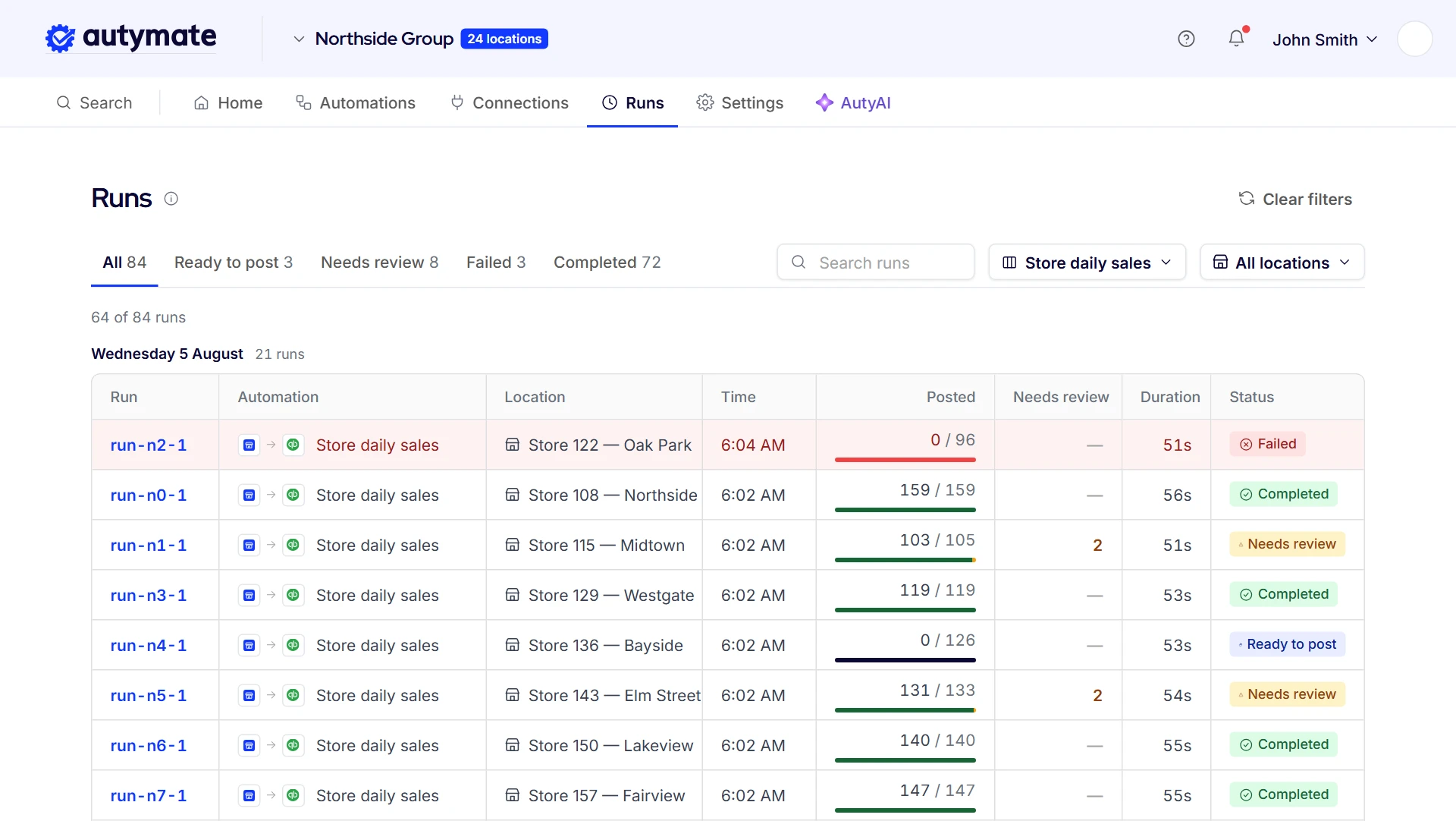
Nothing reaches the books, the online store or the ERP until it has been checked. Each run is listed on its own, by store and by system, with what posted, what is waiting and why. A department with no mapping or a deposit that doesn't match waits in review with the reason in plain language, and the rest of the run carries on.
- Each store's runs listed separately
- What posted, what is waiting and why
- Plain-language reasons for anything held
- Duplicate orders held, not posted twice
- Queued and retried runs shown
This is the first question an owner asks on Monday: did every store's weekend actually go through? Every run shows its result, so a bookkeeper or operations lead can check sales, stock and deposits without opening each system. Queued and retried runs show there too.
Autymate Posts Daily Sales for 2,500+ The UPS Store Locations
The UPS Store's 2026 franchise disclosure document names Autymate its approved vendor for QuickBooks Pro.
Every store owner in the network keeps their own books, and every store's day starts in MPOS, the franchise's point-of-sale system. Autymate takes each store's daily sales, compiled in the franchise's reporting system, and posts them to that store's own QuickBooks Online or Desktop file on one mapping. A store that sends nothing for an open day is flagged the same day instead of surfacing at month-end. It is the same work this page describes, at the scale of a national franchise network.
- Each store's MPOS daily sales posted to its own QuickBooks Online or Desktop file
- One mapping template, copied to each store as it connects
- A store that sends nothing flagged the same day
2,500+The UPS Store locationsEach store's day, posted to its own QuickBooks file
 Autymate also built the QuickBooks Online import that Batteries Plus franchisees use for the franchisor's GL and AP files.The Batteries Plus program
 Retail Integration Questions
Intuit discontinued QuickBooks Desktop Point of Sale in October 2023, so most stores moved to Shopify POS, Square, KORONA or Counterpoint.
The new register doesn't have to change your books. Autymate connects it to the QuickBooks Online or Desktop file you already keep, each store's day posting to its own class, location or company file, with the departments mapped to the accounts you used before.
Sometimes.
A native connector or a Zapier flow can work well for one store sending one kind of record. It gets harder with several stores, several systems and records that need checking before they post, which is often when bookkeepers switch connectors off. Autymate maps every field once, checks each record, holds anything unsure for review and lists every run, so the integration is looked after rather than rebuilt.
It depends on how the stores are owned.
Stores that share one company usually sit in one QuickBooks file, each as a class or a location, while a store that is its own company, like most franchised stores, keeps its own file. Autymate posts each store's day where it belongs in either setup, on one mapping, so a new store starts posting the same way the day it opens.
Yes.
Hours clocked and commission earned at the register go to Gusto, ADP or Paychex as pay lines for the store that ran them, using the rates you set. An employee who works at two stores is paid once, with each store's hours kept with that store for labor cost. Anyone without a pay rate for a shift waits for review instead of being paid a guessed amount.
No.
Each store keeps the POS it already runs, and the staff at the counter keep working the way they do today. Autymate connects that system to your online store, ERP, CRM, payroll and accounting system on the mapping you approve. Moving every store onto one system means exports, retraining and numbers that don't carry over, and integration closes the gaps without it.
On the schedule you choose, and on demand whenever you need it.
A common setup sends stock and online orders several times a day and posts each store's day once after close. Each run is listed with its result, so a missed or held run shows up the same day instead of at month-end, when it is much harder to trace back to the store it came from.
Only the fields the approved mapping uses: sales by department and payment type for the books, for example, or customer name, email and purchases for a CRM connection.
You approve each connection before it runs, and you can pause one store without touching the rest. Autymate holds a SOC 2 Type II report, and every run is logged, so you can see exactly what moved.
Autymate does the most for retailers running several stores or several systems: a register, an online store, an ERP or a CRM, payroll and more than one set of books.
A single store whose register already sends everything it needs to the books gets less from it. The more stores and systems you run, the more re-keying and checking an integration removes from the week.
One Saturday at Midtown, From the Counter to the Books
From the first sale to the bank deposit, Autymate moves each record to the next system and checks it first.
Saturday at the Midtown store: the counter to QuickBooks Online
Sell
A $54.00 sale rings up at Midtown's counter, and its receipt starts the day's record.
ReplacesKeying the Z report into the books
Stock
Two candles come off Midtown's count and the online store shows two fewer; a line from an unmapped department waits for review.
ReplacesUpdating stock on the website by hand
Customer
The receipt reaches the customer's Klaviyo profile with 54 points.
ReplacesExporting customer lists for email
Restock
Mug sets run low, PO-1042 goes to the supplier, and the $444.00 bill posts when the delivery is received.
ReplacesMatching supplier bills to deliveries
Post
Saturday posts to QuickBooks for Midtown, and the $2,279.82 card deposit ties out.
ReplacesRebuilding the deposit from the batch report
The same flow at every store
- Midtown
- Westgate
- Bayside
- Northside
- Your stores
Page notices
The examples on this page are illustrations. The store, order, stock, customer and deposit figures show how the data moves; they are not customer data, and results depend on your own systems and setup.
The UPS Store and Batteries Plus are named for the integrations Autymate runs and built for their franchise networks. The store count and the approved-vendor reference come from Autymate's own work and The UPS Store's 2026 franchise disclosure document; no figure here is a store's own result.
QuickBooks and Intuit are trademarks of Intuit Inc. The UPS Store, Batteries Plus, Lightspeed, Square, Shopify, KORONA, NCR Counterpoint, Sage, Oracle NetSuite, Microsoft Dynamics 365, Klaviyo, Mailchimp, Salesforce, HubSpot, Gusto, ADP, Paychex, Xero and the other names on this page are trademarks of their respective owners, used to identify the systems retailers run. No endorsement or partnership is implied.