Your transactions move into your accounting system automatically.

Autymate Transactions posts your sales, payments, bills and payroll into the books you already keep. Mapped once, previewed before it lands, scheduled at every location.

  • Reusable mappings
  • Scheduled runs
  • Multi-location routing
  • Exception review
  • Run history
The Autymate Transactions console: a dashboard showing the month’s runs, transactions posted, posting success rate and active connections, above a table of scheduled automations posting into QuickBooks Online.
SearchHomeAutomationsConnectionsHistorySettingsCreate automation

Good morning, John Smith

205 transactions posted to your books automatically today.

Runs this month

10

Transactions moved

1,086

Posting success rate

99.2%

7 transactions waiting on you · in 2 runs

Active connections

3

Automations

Recent runsScheduled nextSee all automations
  • Daily Sales ReceiptCharges → Daily Sales Receipt · Net sales, tax and discounts summarized per day8 fields6:00 AMDailyActive
  • Payroll Journal EntryRegister → Payroll Journal Entry · Gross pay, employer taxes and liabilities split into a balanced entry5 fields6:00 AMDailyActive
  • Stripe payoutsPayouts → Deposit · Payments, refunds and processing fees split out5 fields7:15 AMWeeklyPaused

The accounting systems we integrate with

Whichever books you keep, we post into them. No migration, no new ledger.

  • QuickBooks OnlineQuickBooks Online
  • QuickBooks DesktopQuickBooks Desktop
  • XeroXero
  • Sage IntacctSage Intacct
  • Oracle NetSuiteOracle NetSuite
  • FreshBooksFreshBooks
  • Zoho BooksZoho Books

What changes when transactions post automatically

  • Your books are current before you open them.

    Yesterday’s sales, card fees and payments are already posted and coded when you sit down.

    Exporting yesterday and typing it in
  • Your bank matches your books.

    Settlements arrive split into sales, fees and refunds, so the deposit on the statement is the deposit in your ledger.

    Hunting for the difference on the statement
  • Month-end starts finished.

    No catch-up week. The entries have been landing correctly all month, so close is a review rather than a rebuild.

    A week of reconciling before you can close
  • Every location reports the same way.

    One setup applied across sites, so you can compare stores without first agreeing what the numbers mean.

    Ten sites, ten spreadsheets, ten methods

The transaction data we move into accounting

Whatever your business records, we turn it into the entry your books expect.

From your point of saleA day of tradingToastSquareCloverLightspeed
In your booksSales receipts, coded to your accountsSales, tips, discounts and tax, each to the account your accountant chose.
From paymentsA settlement from your processorStripeSquare
In your booksA deposit that reconcilesGross sales, processing fees and refunds separated so the bank line matches.
From e-commerceOnline orders and returnsShopify
In your booksInvoices, customers and credit notesStorefront activity kept in step with finance, without an export step.
From a spreadsheetA recurring CSV or Excel fileMicrosoft ExcelGoogle Sheets
In your booksInvoices and bills, mapped the same way every timeThe same field mapping every period, so the file uploads without being cleaned up first.
From your teamBills and approved expenses
In your booksBills, ready to payCoded, attached to the right supplier, waiting in your payables.
From payrollA payroll run
In your booksA journal entry that balancesWages, taxes and employer liabilities to the right accounts, every cycle.
From inventoryStock movementLightspeedShopify
In your booksCost of goods, kept honestWhat sold and what it cost, so margin is real rather than estimated.

The daily accounting work this removes

Your morning to-do list, twice. The same six jobs; on the right, they are already done.

Today6 jobs

Before you can trust a single number.

  • Export yesterday from every system
  • Fix up the spreadsheet
  • Work out which account each line goes to
  • Type it into your books
  • Find whatever did not match
  • Do it all again tomorrow

With Autymate0 jobs

The same six, already done when you sit down.

  • Export yesterday from every system
  • Fix up the spreadsheet
  • Work out which account each line goes to
  • Type it into your books
  • Find whatever did not match
  • Do it all again tomorrow
Sometimes: approve an odd oneOnly when something genuinely needs your call.

How it works: connect, map, validate, automate, monitor

You set this up yourself, inside the app. Once, then it runs on its own.

Get started

Automatic, with validation before anything posts

  • You see it before it posts

    Nothing is written to your books until you have looked at what it would write.

  • It never guesses

    Anything it is unsure about waits for you instead of landing somewhere plausible.

  • You can always show your working

    Every posted figure traces back to the day and the run that created it, and a run that stopped shows up the same day rather than at month-end.

Multi-location accounting: ten sites, one set of books

Every site posts the same way, so the numbers add up without anyone chasing them.

  • Add a site in minutes using a setup that already works.
  • Each location keeps its own connections and its own history.
  • Compare stores on numbers that were built the same way.
  • Pause one site without touching the rest.
See multi-location pricing
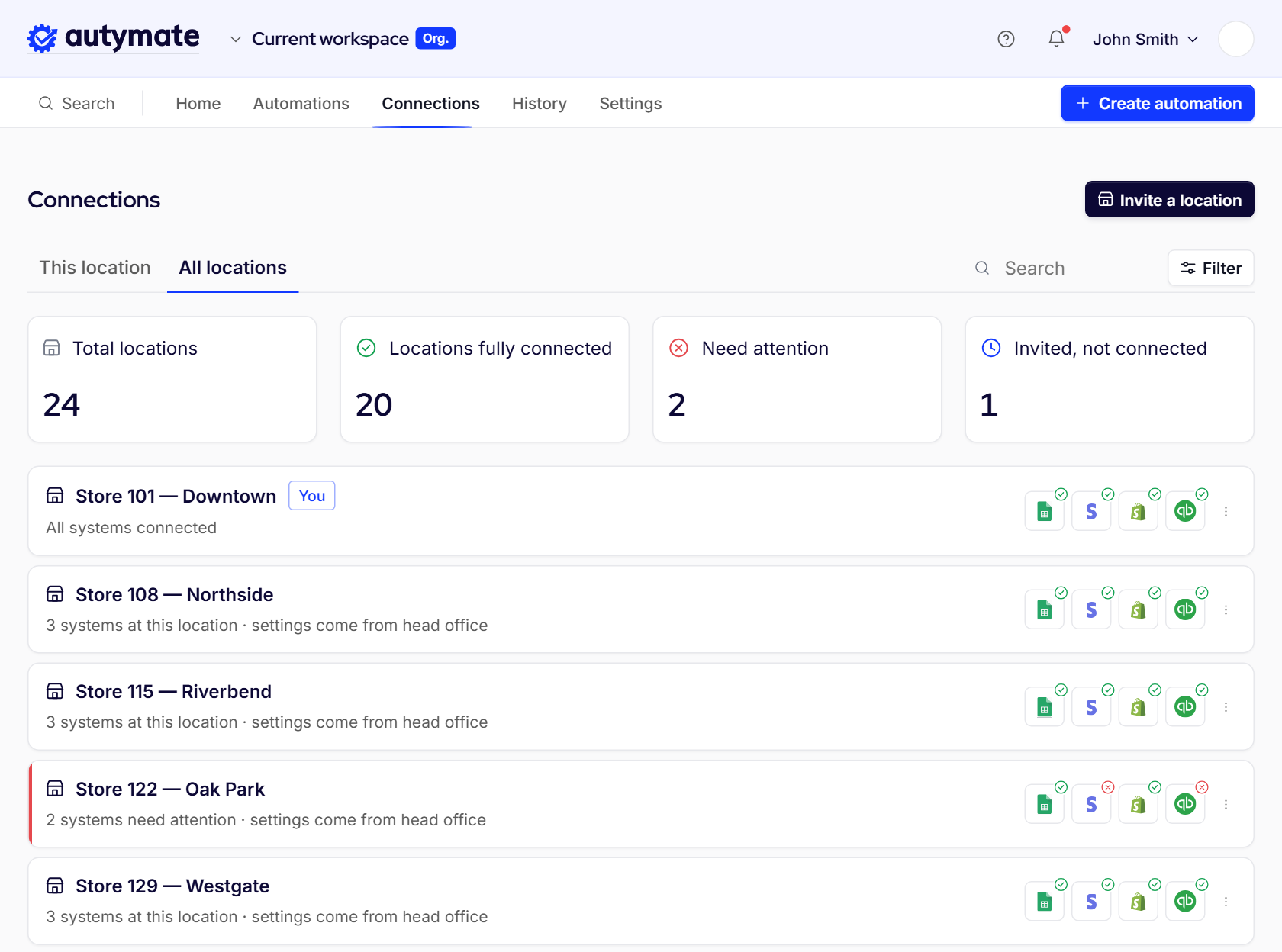
The Connections screen with All locations selected: 24 total locations, 20 fully connected, 2 needing attention, 1 invited, above a list of stores showing which systems each one has connected.

Accounting automation results: 0 errors and $31K saved

Work this has already removed, at two named customers. Both stories are published in full, with the numbers they gave us.

School of Bookkeeping

0 errors

on QuickBooks invoice imports, after field-level mapping and validation before posting.

“I download the CSV, upload it without manipulation, and the import happens auty-magically.”

Dan Delong, Chief Content Creator, schoolofbookkeeping

Massaging that monthly CSV by hand used to take 30 minutes to an hour.

Read the story

Jimmy John’s

$31K

saved in labor by a franchisee running 11 Jimmy John’s stores.

Daily point-of-sale entries from all eleven sites post into QuickBooks Desktop on their own, returning more than 20 hours a week at 100% accuracy.

Read the story

Autymate Transactions pricing

Start today, on your own. Connect your systems, see your first run, and go live without waiting on anyone.

  • Single location

    $25per month

    One business, one set of books.

    • Your accounting system connected
    • Daily sales and payments posted
    • Preview before anything posts
    • Full run history
    Start free
  • Multi-location

    $25per location, per month

    Franchisees, multi-unit operators, bookkeepers and CPA firms running several sets of books.

    • Everything in Single location
    • One setup applied to every site
    • Per-location history and permissions
    • Bills, payroll and inventory
    Start free
  • Franchise network

    Talk to us

    Franchisors standardizing across the network.

    • Everything in Multi-location
    • Network-wide standards and onboarding
    • Custom integrations built with you
    • Named support
    Contact sales (opens in a new tab)

Need something outside accounting?

Autymate Transactions is the accounting product — self-serve and priced. The same platform also builds custom integrations between any systems you run, set up with you rather than by you.

Explore the platform

Common questions about Autymate Transactions

Autymate Transactions is the controlled transaction-movement layer between your operational data and your accounting system. It is broader than a QuickBooks Online importer: you connect a source, map the fields, validate before posting, automate the run, monitor what moved, and resolve exceptions, across repeatable accounting data workflows. Sources include point of sale, payments, e-commerce, payroll and recurring CSV or Excel files.

No, and this is not QuickBooks-only. We post into the system you already use: QuickBooks Online or Desktop, Xero, Sage Intacct, Oracle NetSuite, FreshBooks or Zoho Books. Nothing migrates, no new chart of accounts has to be agreed on first, and your books stay the source of truth.

Yes. A recurring CSV or Excel file is one of the supported sources. You define the file's structure, the record it becomes and the field mapping once, and every following period uses that same saved mapping, so the file uploads without being cleaned up or rebuilt first.

Yes. A configured workflow runs on demand or on a schedule, so the same approved setup runs again tomorrow instead of being rebuilt. Pick the cadence that matches how your business closes its day. You can pause a schedule and start it again without taking the workflow apart.

Nothing is written to your books until you have looked at what it would write. Anything it is unsure about waits for you instead of landing somewhere plausible: it goes to a review queue with the reason, you correct the data or the mapping, and retry. The rest of the run is unaffected.

The same work, without the keying. Yesterday's sales, card fees and payments are already posted and coded when they sit down, so the job becomes reviewing what landed and handling the exceptions. Month-end stops being a catch-up week and becomes a review.

No. Your accounting owners still decide the destination records, the accounts, the tax treatment, the classes and locations, and how reconciliation works. Autymate Transactions makes those approved rules repeatable, so the same decisions are applied the same way on every run instead of being made again by hand every period.

Connect your accounting system and you can see your first run the same day. Because entries post into the ledger you already use, there is no migration to schedule and no new chart of accounts to agree on first.

The standard connections cover the common point-of-sale, payment, e-commerce, payroll and inventory systems. Where a system can be connected directly, it is. Where it cannot, a recurring file export from it is still a supported source. And where neither fits, the same platform builds a custom integration between the systems you actually run, set up with you rather than by you.

No. One setup is applied across sites, so adding a location takes minutes using a configuration that already works. Each location still keeps its own connections and its own history, and you can pause one site without touching the rest.

You can see exactly what would post before anything is written to your books, so you can judge it against your own numbers rather than a description. Talk to us and we will connect your accounting system and walk you through a first run.

Autymate Transactions is the accounting product. The same platform also builds custom integrations between any systems you run, including point of sale, CRM, ERP, databases and other business applications, set up with you rather than by you.

Your books should already be done Autymate does them for you

Connect your accounting system and see your first run today.