PayPal QuickBooks Integration for Payments, Fees, Refunds and Bank Transfers
Turn every PayPal transfer into QuickBooks entries that match the bank deposit.Sales, sales tax, PayPal fees, refunds, disputes, held funds and currency conversions are mapped to your chart of accounts, checked before they post, and monitored after go-live.
Income counted once, never twice.
Invoices paid through PayPal applied to the open invoice.
Several PayPal accounts or companies on one template.
Yes. Autymate connects PayPal to QuickBooks Online by posting each PayPal transfer as one checked entry: sales, sales tax, PayPal fees, refunds, held funds and payments sent are mapped to your chart of accounts, invoice payments close their invoices, and the transfer is matched to the bank deposit. Intuit's PayPal Connector by QuickBooks and PayPal's own Accounting Sync also bring PayPal activity into QuickBooks for review.
PayPalAutymateQuickBooks Online
What Autymate Adds to PayPal and QuickBooks Online
One entry per transfer, matched to the bank deposit
PayPal fees in their own account, sales kept at gross
Income counted once, invoices closed, not sold twice
Several PayPal accounts or companies on one template
Watched by Autymate's team after go-live
One PayPal Transfer to QuickBooks Online, Explained Line by Line
Autymate reads one week of PayPal activity and posts every payment, fee and hold where it belongs.
Autymate reads one PayPal week: 1,248 payments and one transfer.
Autymate splits PayPal's fee out of every payment, keeping sales at gross.
Autymate applies 12 wholesale payments to their open QuickBooks invoices.
Autymate keeps held funds aside and holds a new dispute fee for your team.
Autymate posts one entry equal to the transfer that reached your bank.
Before
Business checkingBank feed
PayPal transferNov 16+$89,416.45
One line, no detail
ActivityNov 9 – 15, 2026
Payments received$104,150.58
1,248payments
Fees, refunds, holds, a dispute
To bank, Nov 16−$89,416.45
AutymateReading the week
Payments
PayPal fees
Refunds
Held funds
Disputes
Bills paid
Invoices
Transfer
How Autymate Reconciles One PayPal Transfer, Step by Step
Cookware brand selling on its own web store and to wholesale buyers · one PayPal week, Nov 9 – 15 · sample figures
1
Read the week's PayPal activity.
Autymate picks up every payment, fee, refund, hold, dispute and payment sent in Brightwater Kitchen's PayPal account for November 9 to 15, and the transfer of that week's balance to the bank on the 16th.
Replaces: downloading PayPal's activity report into a spreadsheet.
2
Split the transfer into what it really is.
$104,150.58 arrived in 1,248 payments, including $4,612.38 of sales tax the web store charged. PayPal took $4,246.38 in fees, $2,296.40 went back to customers as refunds (PayPal kept the original fees), and a $6,250.00 packaging bill was paid from the balance.
Replaces: booking the bank deposit as revenue.
3
Apply invoice payments to their invoices.
Twelve wholesale customers paid $11,600.00 of open QuickBooks invoices through PayPal. Autymate applies each payment to its invoice, so those sales, already recorded, are never added again.
Keep what isn't in the transfer, and hold what doesn't fit.
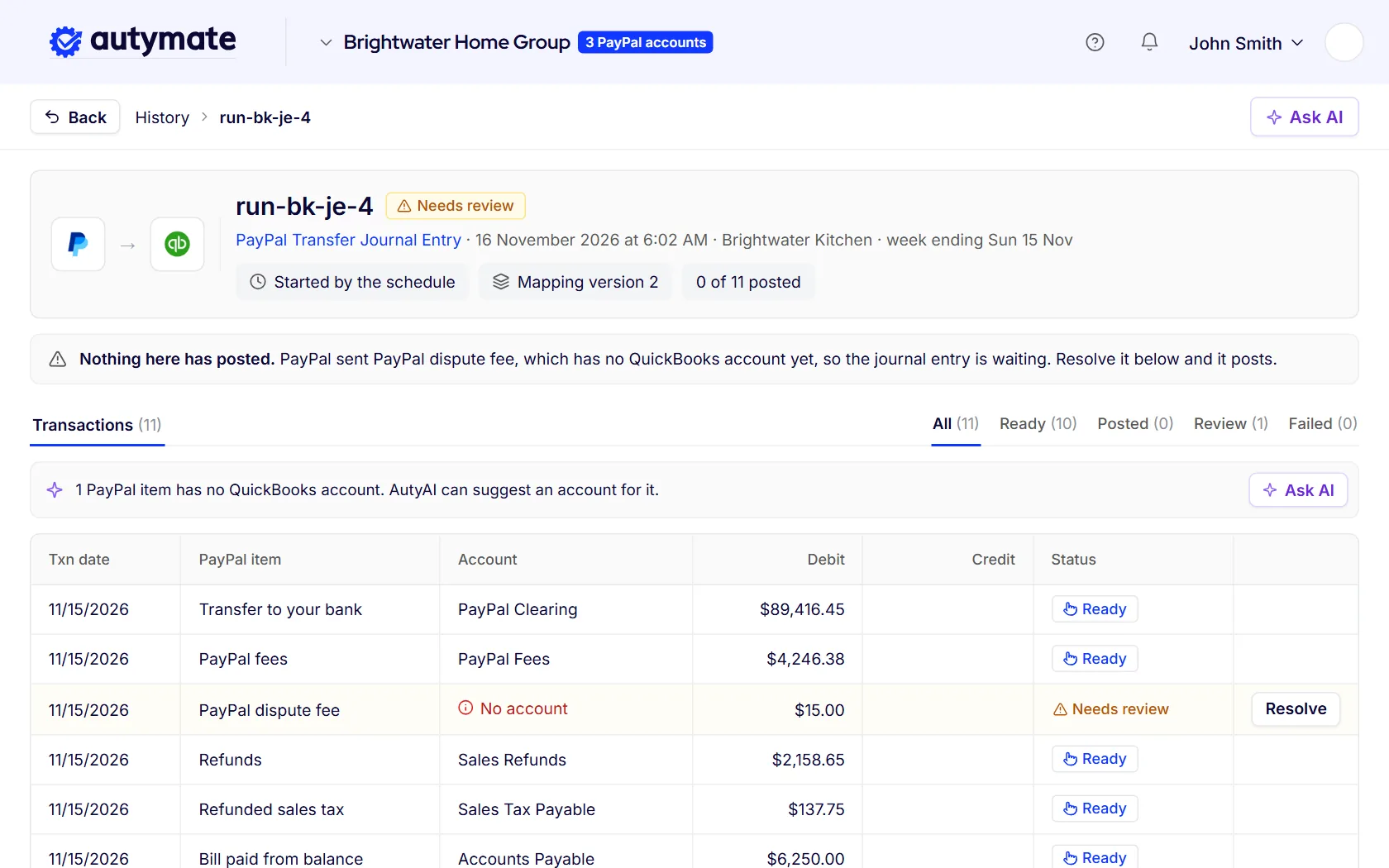
The $1,799.20 PayPal is holding until delivery is confirmed, and a $127.15 payment under dispute, stay in balance-sheet accounts until PayPal releases them. The $15.00 dispute fee, the first this account has had, has no mapping yet, so it is held for review with the reason shown.
Replaces: chasing a “missing” $1,926.35 and clearing Uncategorized at month end.
5
Match the bank deposit.
Once your team maps that fee, the entry nets to exactly $89,416.45, the transfer that reached the bank, and posts as a transfer from PayPal to your bank, never as income. Every line carries its PayPal transaction ID back to the activity report.
Replaces: hunting for why the deposit doesn't match sales.
Step 1 of 5
PayPal Income Counted Once in QuickBooks, Never Twice
The same PayPal dollar can reach QuickBooks by three paths. Autymate records it once.
A PayPal sale is counted twice when two paths record the same money: the payment and the bank deposit it becomes, or the payment and a store order or invoice already in QuickBooks. Autymate posts each sale once, closes paid invoices, and records the bank transfer as a move between your own accounts.
Three ways one PayPal dollar reaches QuickBooks twice, and how Autymate records it once. Sample figures.
Where the same dollar shows up
×2Counted twice
Counted once with Autymate
The transfer to your bank$89,416.45
×2Counted twice
The bank deposit gets booked as sales, repeating the PayPal payments.
Counted once with Autymate
Autymate posts it as a transfer, never as income.
Orders your web store already posted$87,938.20
×2Counted twice
Your store app and PayPal both post the same 1,236 orders.
Counted once with Autymate
Autymate clears the store's orders against the PayPal payments.
Invoices already in QuickBooks$11,600.00
×2Counted twice
Twelve invoice payments get posted as new sales, on top of the invoices.
Counted once with Autymate
Autymate applies each payment to its open invoice.
One week, 1,248 PayPal payments, $104,150.58 received: every dollar recorded once.Sample figures
Record PayPal Transactions in QuickBooks Online With Reusable Templates
Autymate's team builds PayPal templates around your business. Every location or account reuses them, or you build your own.
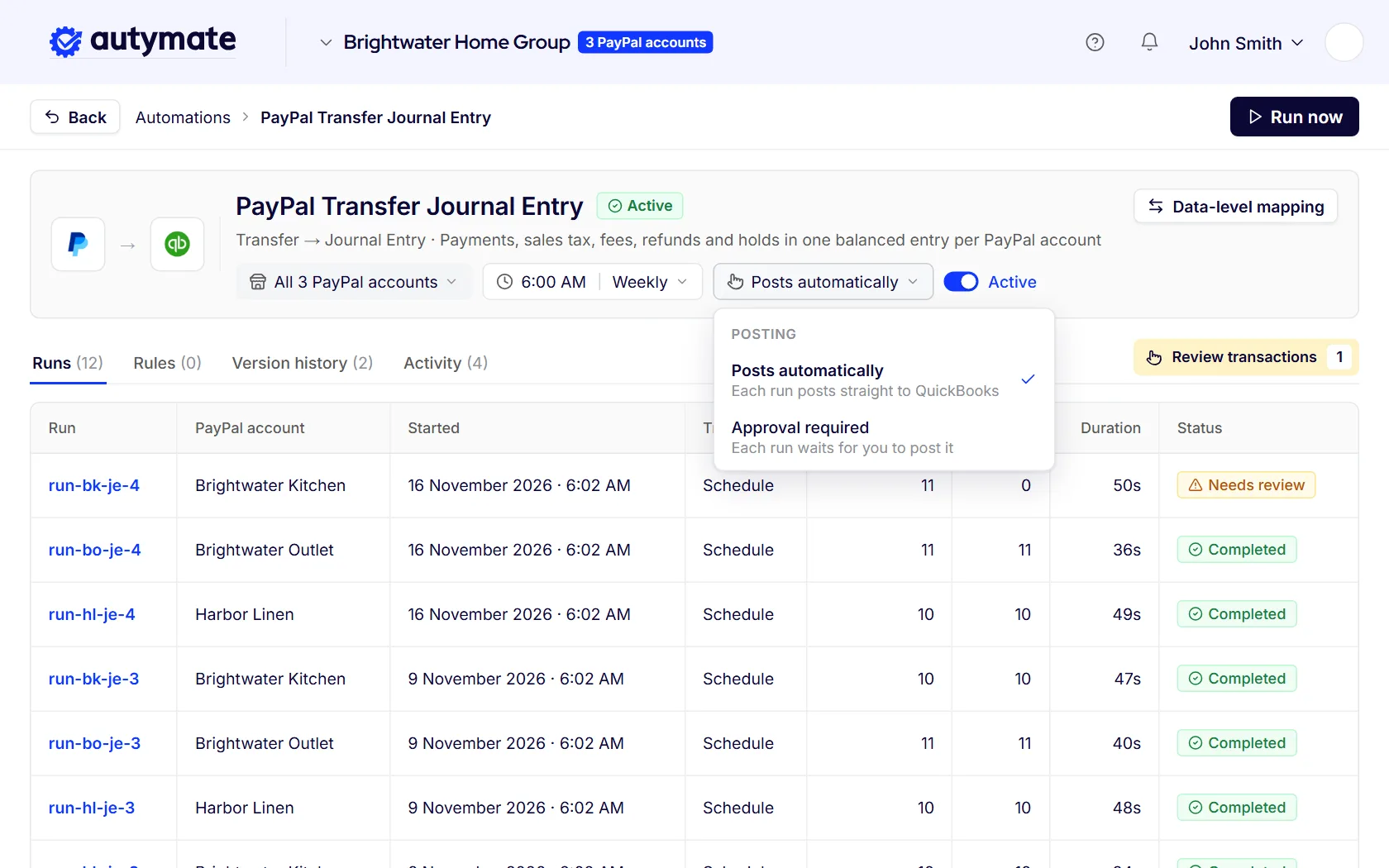
To record PayPal transactions in QuickBooks Online, Autymate runs a template: a trigger, such as a weekly schedule or an uploaded PayPal export, and an action, such as one balanced journal entry. Autymate's team builds the templates with both set, plus the mapping, and every location or PayPal account reuses them: connect, check the settings and turn it on.
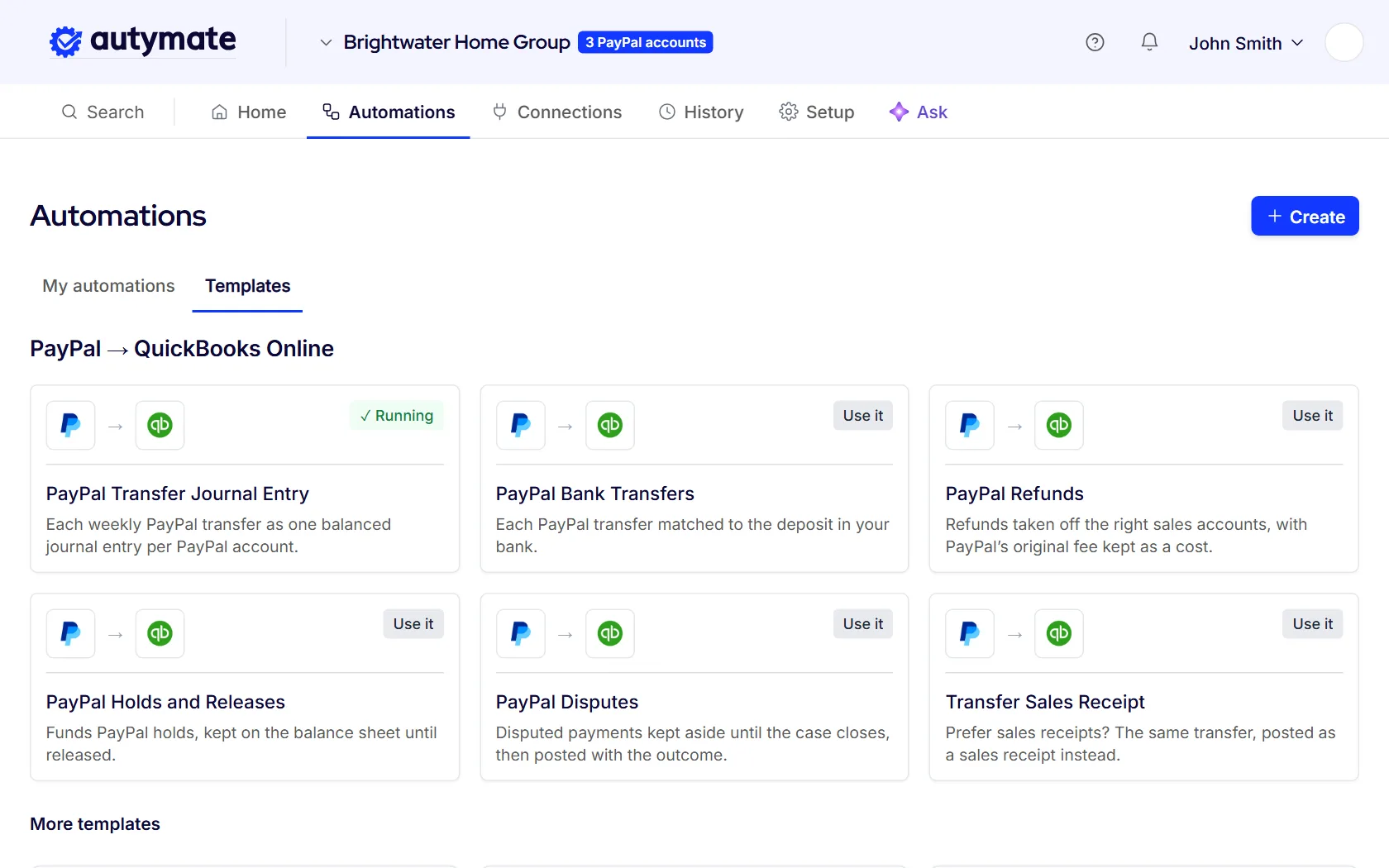
Built-In PayPal Templates for QuickBooks Online
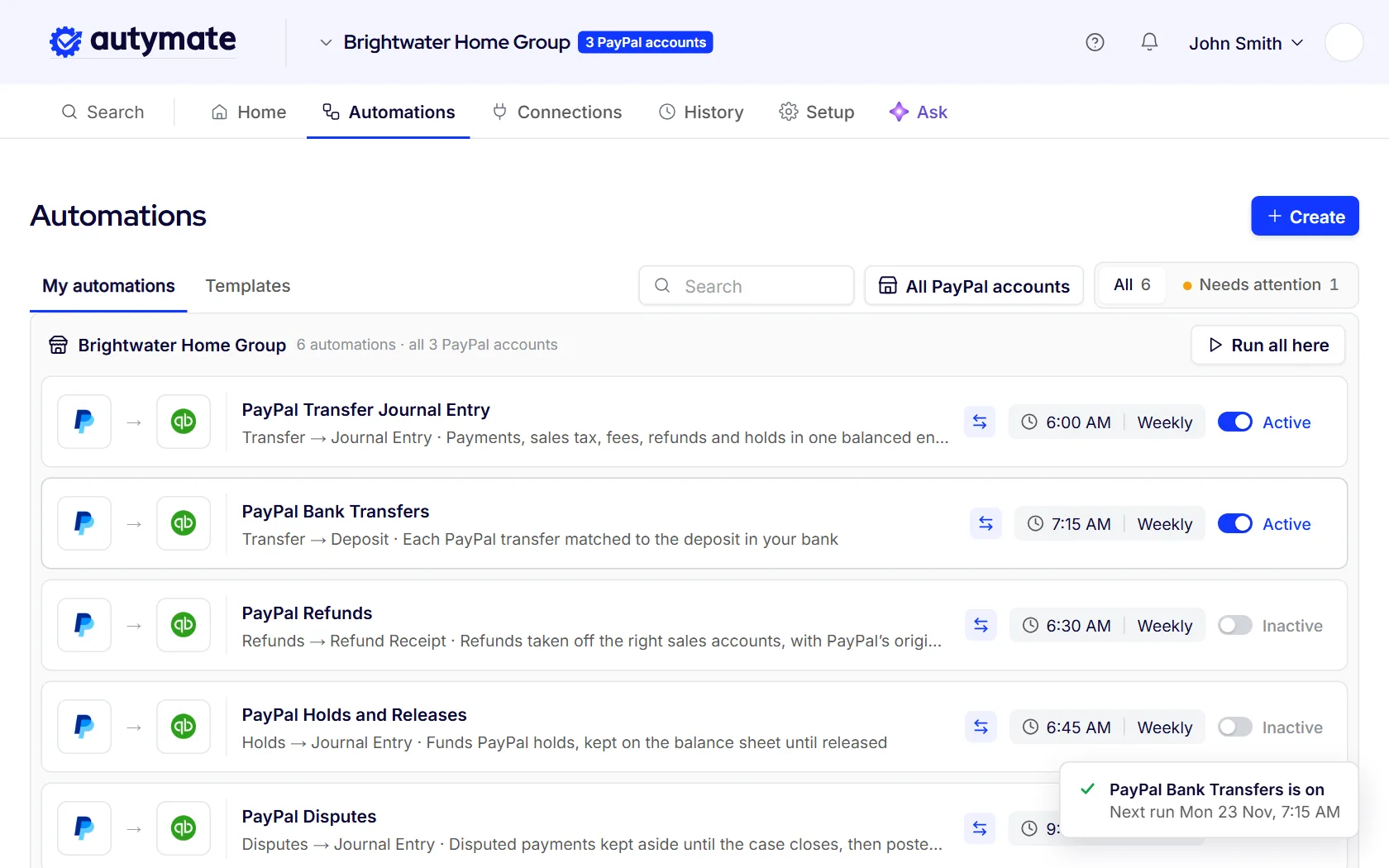
Built by Autymate's team for your business, then reused: apply a template to every location, brand or PayPal account, and change a setting where one needs its own.
→
PayPal Transfer Journal Entry
Each PayPal transfer as one balanced journal entry per PayPal account: payments, sales tax, fees, refunds and holds.
Trigger
Weekly schedule
Posts
Journal entry
→
PayPal Bank Transfers
Each PayPal transfer matched to the deposit in your bank.
Trigger
Weekly schedule
Posts
Bank deposit
→
PayPal Refunds
Refunds taken off the right sales accounts, with PayPal's original fee kept as a cost.
Trigger
Weekly schedule
Posts
Refund receipt
→
PayPal Holds and Releases
Funds PayPal holds, kept on the balance sheet until released.
Trigger
Weekly schedule
Posts
Journal entry
→
PayPal Disputes
Disputed payments kept aside until the case closes, then posted with the outcome.
Trigger
Weekly schedule
Posts
Journal entry
→
Transfer Sales Receipt
The same transfer, posted as a sales receipt for books that prefer them.
Trigger
Weekly schedule
Posts
Sales receipt
Start From Scratch
Pick the trigger and the QuickBooks Online record yourself, then map each PayPal line.
Autymate's team builds your templates, and they wait in Automations, then Templates. Each one already knows its trigger, the QuickBooks Online record it posts and how PayPal's lines map to your accounts.
Apply It to Every Account
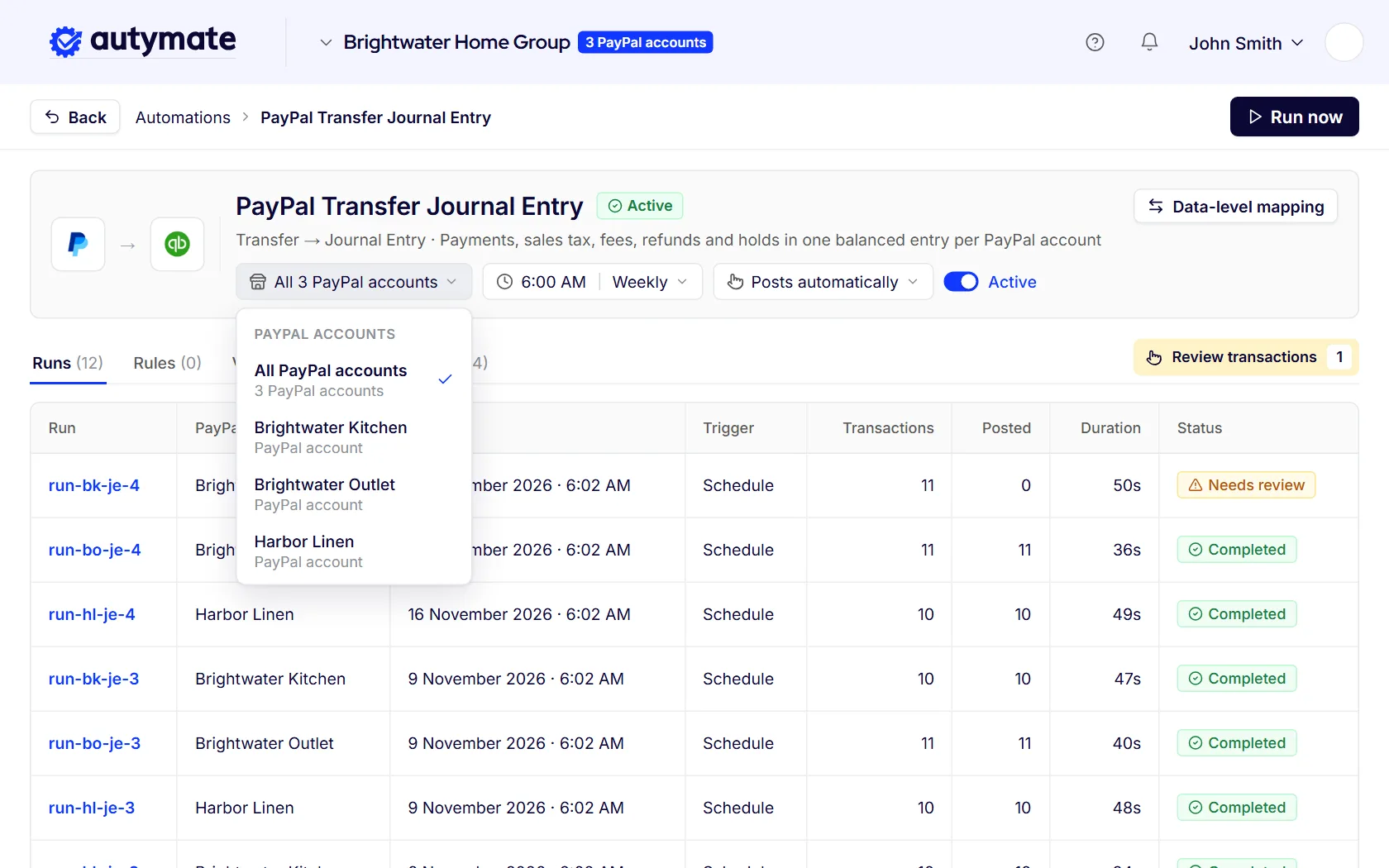
Connect each PayPal account and QuickBooks company once, then apply the template to all of them or only some. Each PayPal account posts to its own QuickBooks company, or its own class in a shared one.
Change a Setting for One Account
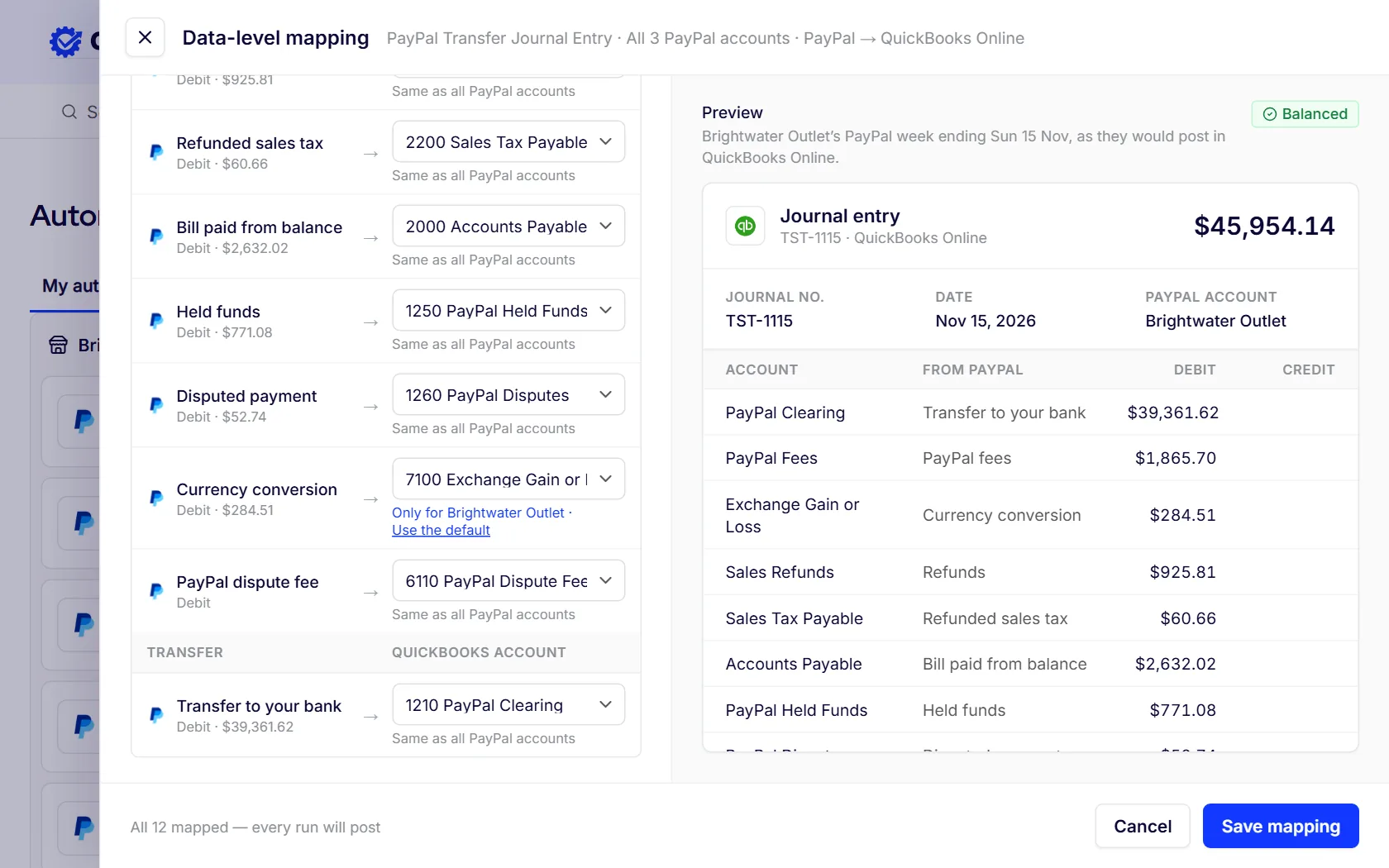
Every line follows the template, so every account posts the same way. Where one works differently, change that line for it alone: Brightwater Outlet sends currency conversions to its own account.
Set the Trigger
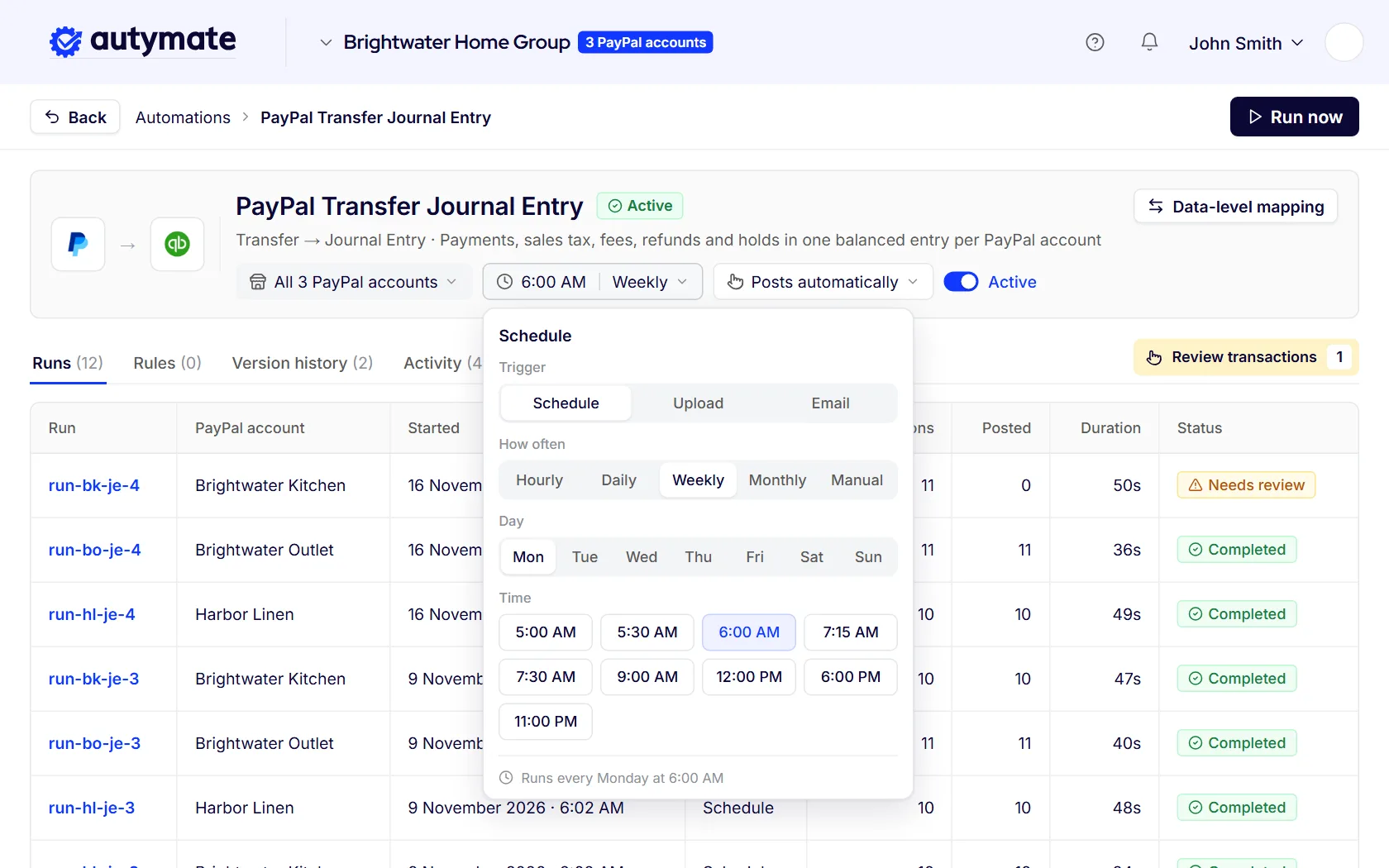
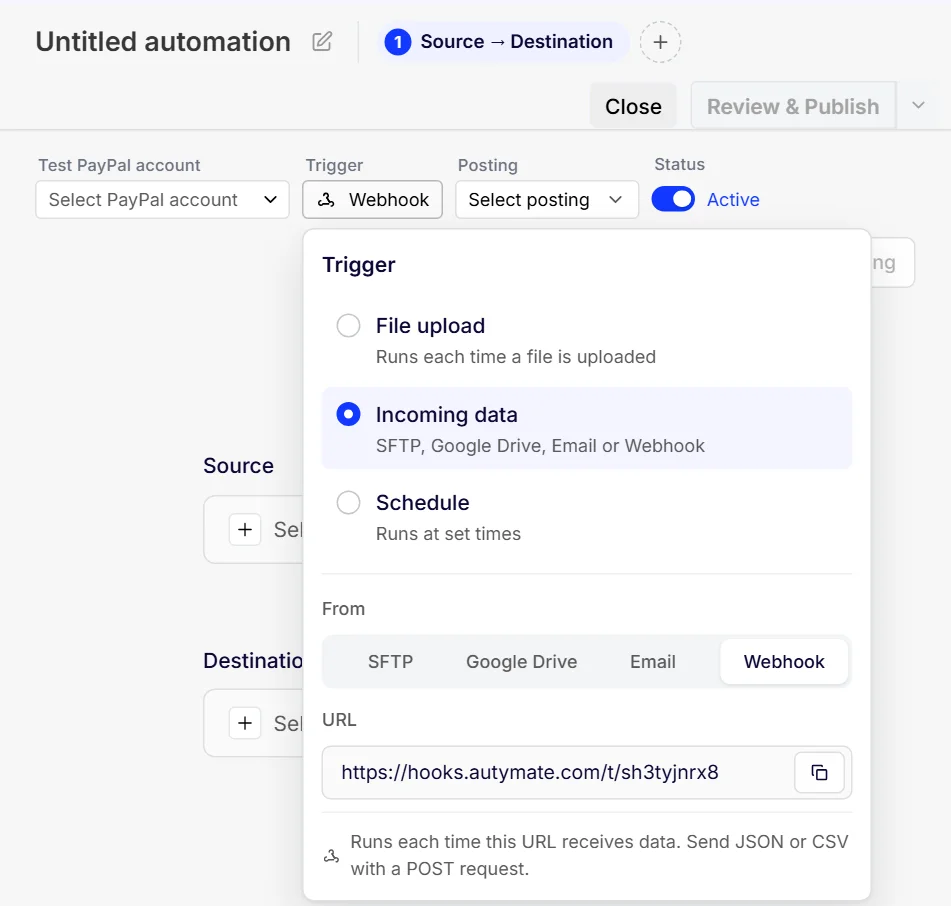
Choose what starts each run: a schedule (hourly, daily, weekly or monthly, at the time you pick), an uploaded PayPal export, or an email with the report.
Choose How It Posts
Post each run straight to QuickBooks Online, or have every run wait for your approval. Either way, a line Autymate can't place is held for review, never guessed.
Turn It On
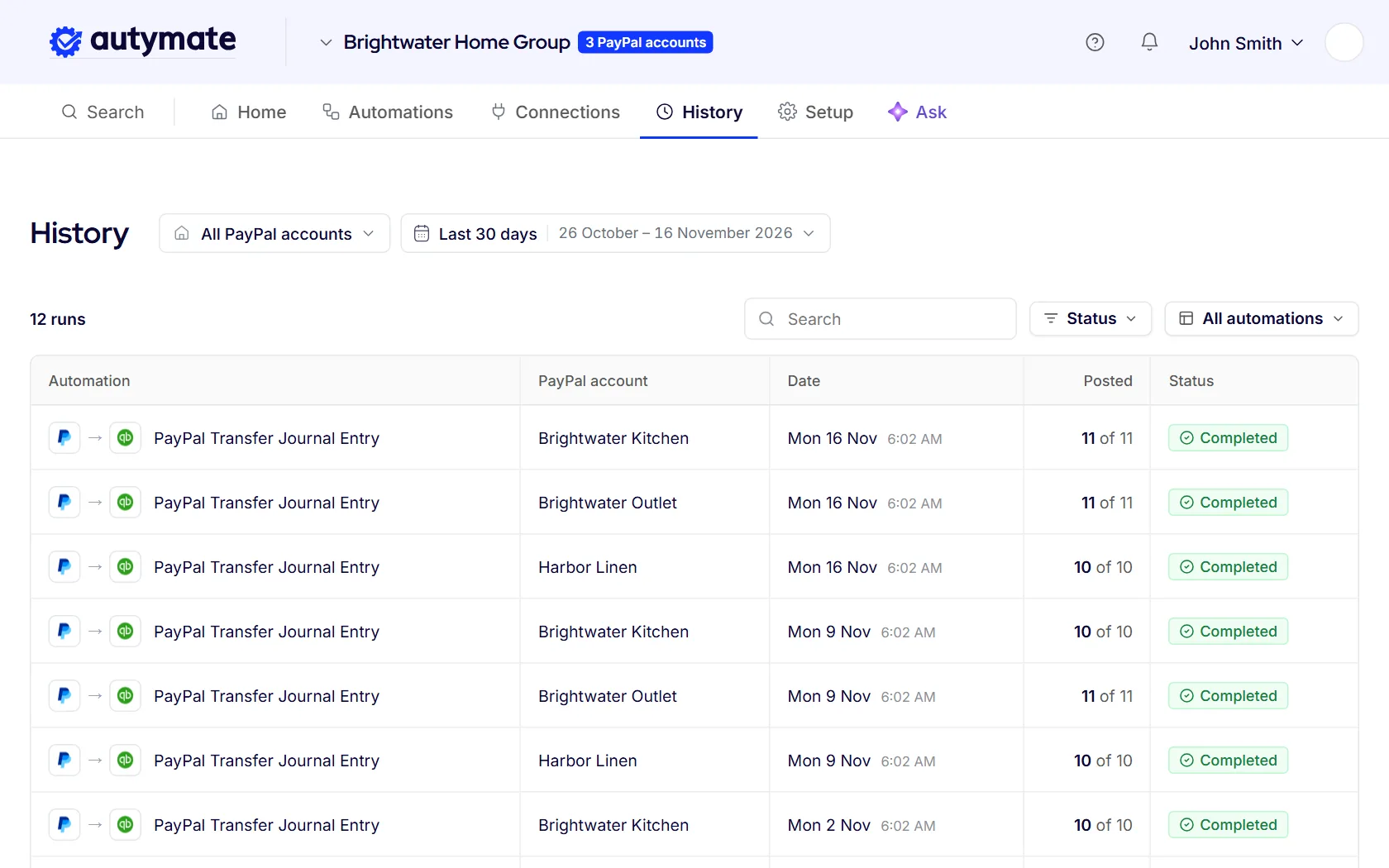
Switch the automation on for one PayPal account or all of them. Autymate shows the next run, and every run lands in History with its entry.
Can One PayPal Template Run Across Multiple PayPal Accounts?
Yes. Autymate's team builds one template for the way your business records PayPal, and every location, brand or PayPal account reuses it. Each account posts to its own QuickBooks Online company, or to its own class in a shared company, and any account can change a setting for itself without touching the rest. A new account starts from the same template.
Build Your Own PayPal Automation
Start from scratch: choose what starts each run and what it posts, then map the lines.
Triggers: What Starts a Run
ScheduleHourly to monthly, at the time you set
File uploadEach time a PayPal export is uploaded
Incoming dataSFTP, Google Drive, email or a webhook URL
Run nowBy hand, for any day or week
Actions: What Posts to QuickBooks Online
Journal entry
Sales receipt
Refund receipt
Bank deposit
Post automatically or after approval
Add more steps
Every automation keeps Autymate's controls
Unmapped lines held for review
Payments already posted skipped
Each entry linked back to PayPal
Real Autymate screens, set up by Autymate's team for a sample brand group with three PayPal accounts. Names and figures are samples.
QuickBooks Online Integrations Autymate Builds and Runs
Businesses rely on Autymate to record the payments they receive in QuickBooks and apply each one where it belongs.
Capital Now Funding
Receipts and deposits from its own loan system to QuickBooks Online
A custom daily integration from its own database into QuickBooks Online.
Checks, deposits and other receipts recorded and applied against open receivables.
Exceptions flagged on every run, so the team corrects them itself.
“Autymate allowed us to automate an accounting process that was time consuming and prone to errors. This allows us more time to focus on the business and not on manual repetitive tasks.”
“Helps tremendously when you have multiple stores to know that my data is being transferred automatically. HUGE time saver.”
Annie·QuickBooks App Store
“This app saves time and automates all the manual work I used to do every month.”
RejiJohn·QuickBooks App Store
“…I rarely have any problems. I moved my QB file and when re-mapping something went wrong. I sent support a request and they re-sent data immediately. …”
Victoria Wilkins·Google
QuickBooks Online PayPal Integration: Which Route Fits
Intuit and PayPal each offer a way in. Here is what each one does, as of November 2026.
Intuit's PayPal Connector by QuickBooks, its older Connect to PayPal app and PayPal's own Accounting Sync each bring PayPal activity into QuickBooks Online for someone to review. Autymate is a managed integration: it designs the mapping around your chart of accounts, checks every entry before it posts and matches each transfer to its deposit.
PayPal to QuickBooks Online routes compared, as of November 26, 2026
Route
Built by
History at setup
Several PayPal accounts
Other currencies
Held funds
What you still do
PayPal Connector by QuickBooks
Intuit
Up to 6 months
One at a time
Not stated
Not stated
Confirm each transaction in For Review. PayPal payments from Shopify can't be imported.
Connect to PayPal (older app)
Intuit
Up to 18 months, first setup only
Supported
Not supported
Temporary holds not imported
Review each sale and its linked fee.
PayPal Accounting Sync
PayPal
None; starts the day you connect
Set up separately for each account
Yes, with QuickBooks multicurrency on
To a PayPal holding account
Map each new transaction type. Never posts to Sales Tax Payable.
Autymate managed integration
Autymate
Agreed in your blueprint
Each to its own company or class
Recorded in the currency paid
Kept aside until released
Decide items held for review. Autymate matches every transfer to its deposit.
From Intuit's help articles (updated August 3 to 5, 2026) and PayPal's Accounting Sync guide (June 15, 2026). “Not stated” means the vendor's page doesn't say.
Intuit has replaced its legacy PayPal bank feed with the PayPal Connector. Run one PayPal route at a time: PayPal warns that its sync beside the PayPal Connector creates duplicate transactions.
Is a Built-In PayPal Route Enough for You?
Five questions. If every answer is no, a built-in route will likely do.
yes answers
A built-in route will likely do
Start with Intuit's PayPal Connector by QuickBooks or PayPal's Accounting Sync, and run only one of them.
That's what a blueprint maps
Autymate sets out how each PayPal account, currency and sales source will post before anything is built.
Start with a blueprint call. Autymate maps your PayPal accounts, QuickBooks companies, fee accounts and how sales, invoice payments and transfers should be recorded. You then authorize Autymate's access to each PayPal business account and connect QuickBooks Online. Recent weeks post in test and are checked against PayPal's statement before go-live. After that, entries post on their own and Autymate's team monitors the runs.
Why doesn't my PayPal transfer match my sales?
Because the transfer is what's left. PayPal takes its fee from each payment, refunds come out of your balance, some funds may be on hold or under dispute, and you may pay suppliers from the same balance. The transfer to your bank is the remainder, and you choose when to make it. Splitting the activity into those parts makes the QuickBooks entry equal the deposit.
How do I record PayPal fees in QuickBooks?
Record each payment at its full amount and post PayPal's fee to its own merchant fees expense account, rather than recording the net. Sales then stay at gross, the fee cost is visible, and the bank deposit still matches. PayPal's US checkout rate is 3.49% plus $0.49 per payment, with other rates for cards, Pay Later and international payments. Autymate posts the fee on every payment this way.
Does PayPal return its fee when I refund a payment?
No. PayPal charges nothing to send a refund, but it keeps the fee you paid to receive the original payment, on full and partial refunds alike. In QuickBooks the refund posts against sales and the original fee stays as an expense, so a refunded sale still shows what taking the payment cost.
How are PayPal payments in euros or other currencies recorded?
PayPal can hold balances in other currencies but lets you withdraw only in US dollars, converting at its own rate, spread included. Autymate records each payment in the currency it was paid where QuickBooks multicurrency is on, then posts the conversion and its exchange difference when the money moves into dollars.
What happened to the PayPal bank feed in QuickBooks Online?
Intuit has replaced the legacy PayPal bank feed with the PayPal Connector by QuickBooks, an app that brings PayPal transactions into a For Review list for you to confirm. Intuit's older Connect to PayPal apps are still documented, and PayPal now offers its own Accounting Sync. The route table on this page shows what each one does today.
Can I run PayPal Accounting Sync and the PayPal Connector together?
No. PayPal's own guide says to disconnect the PayPal Connector before setting up Accounting Sync, because running both creates duplicate transactions. The same holds for any two routes that bring the same PayPal activity in. When Autymate takes over, the blueprint sets a start date and switches off the route it replaces, so every payment arrives once.
Can Autymate bring in past PayPal activity?
PayPal's reporting keeps three years of transaction history, so past weeks can be brought in once the mapping is approved. They post in a batch, each checked against PayPal's statement, and any payment already in QuickBooks is skipped. For comparison, PayPal's Accounting Sync starts from the day you connect, and Intuit's PayPal Connector imports up to six months.
What happens if a PayPal transfer or a day of activity goes missing?
Autymate flags a PayPal account that sends no activity on a day it usually has some, and a transfer with no matching bank deposit. The run posts once the data arrives, and a payment already posted is skipped. Autymate's team watches every run, so a gap is caught early.
Why doesn't my PayPal 1099-K match the deposits in QuickBooks?
Because Form 1099-K reports the gross amount of payments, before PayPal's fees, refunds and other adjustments, while your bank shows net transfers. Payment apps file one when you receive more than $20,000 in more than 200 transactions in a year. Books that record PayPal payments at gross, with fees and refunds on their own lines, tie to the form. Confirm your filings with your tax advisor.
Is the sales tax in a PayPal payment my revenue?
No. PayPal doesn't calculate, collect or remit sales tax for you: the tax your checkout charged sits inside the payment and is yours to remit. Autymate moves it to Sales Tax Payable, so it never inflates sales. If you sell through a marketplace that uses PayPal, the marketplace may collect the tax itself. Confirm your filings with your tax advisor.
How are PayPal Working Capital repayments recorded?
PayPal Working Capital is repaid automatically from a share of your PayPal sales, so part of each payment never reaches your balance. The repayment belongs against a loan liability, with the fixed loan fee as an expense, not as a deduction from sales. Autymate posts each repayment to the loan account, so sales stay at gross and the loan balance matches PayPal's.
Does it cover Venmo payments?
Pay with Venmo at a PayPal checkout arrives in your PayPal balance like any other payment and posts the same way. A Venmo business profile is a separate account with its own fees and balance, so the blueprint maps it as its own source, with its transfers matched the same way.
Can a nonprofit record PayPal donations at the donor's full gift?
Yes. Each donation posts at the amount the donor gave, with PayPal's fee as a separate expense, so donor records show the full gift. PayPal's US rate for its Donate button is 2.89% plus a fixed fee, and approved charities pay less. Where a donation pays a pledge already recorded in QuickBooks, it is applied to that pledge rather than posted again.
Can PayPal run alongside Stripe, Square and my web store in one QuickBooks company?
Yes. Autymate applies one mapping standard across payment channels and posts PayPal to its own class or location, so QuickBooks shows what each channel brings in and costs. Sales your store or POS already recorded aren't added again from PayPal. The PayPal side clears them instead, so each sale is counted once.
Can a bookkeeping firm run every PayPal client from one place?
Yes. Each client keeps its own QuickBooks company and its own PayPal connection, but every client starts from one template the firm controls. One queue shows every client's held items and transfer history, so a bookkeeper reviews the whole book of PayPal clients from one login and changes only what each client does differently.
How much does a PayPal QuickBooks integration cost?
Intuit's PayPal Connector is an Intuit-built app listed for QuickBooks Online plans, and third-party apps usually price by monthly transactions or connected accounts. Autymate prices the managed integration by the PayPal accounts and QuickBooks companies in scope, and sets the price out in your blueprint before anything is built.
Get a PayPal to QuickBooks Integration Blueprint
Autymate shows how every PayPal payment, fee, hold and transfer will post to QuickBooks Online before anything is built.
What Happens on the Blueprint Call
1
Autymate's team looks at your PayPal activity and your QuickBooks chart of accounts with you.
2
Every type of PayPal line is mapped to an account your accountant approves.
3
You get the plan in writing: what posts where, what waits for review, and the price.
4
Your bookkeeper or accountant is welcome on the call.
PayPal: Merchant Fees, United States. Last updated November 23, 2026.
PayPal User Agreement (holds, reserves, refunds, disputes, withdrawals). Last updated November 4, 2026.
PayPal Help: Why are some of my payments not available right away?
PayPal Help: How do I get money out of my PayPal account?
PayPal Help: What is PayPal Working Capital?
PayPal Business Resource Center: How to accept foreign currency with your business account. September 19, 2026.
PayPal Developer: Step-by-Step Guide, Setting Up PayPal Accounting Sync. June 15, 2026.
PayPal Developer: Reports, and the Transaction Search API. Last updated November 3, 2026.
Intuit QuickBooks Online help: Use the PayPal Connector by QuickBooks app. Updated August 5, 2026.
Intuit QuickBooks Online help: Connect to PayPal FAQ. Updated August 5, 2026.
Intuit QuickBooks Online help: Differences between Connect to PayPal app, Sync with PayPal app, and PayPal Bank Feeds. Updated August 4, 2026.
Intuit QuickBooks Community: PayPal Connector vs existing PayPal bank feed. April 7, 2026.
IRS: Understanding your Form 1099-K. November 17, 2026.
IRS: Form 1099-K FAQs, third party filers. November 24, 2026.
Figures are sample figures from one sample PayPal week, and screens show Autymate on a sample workspace. Your accountant decides your accounting treatment.