



Amazon QuickBooks Integration for Seller Central Settlements, Fees and Payouts

Turn every Amazon settlement into QuickBooks entries that match your bank deposit.

  • Sales, refunds and every Amazon fee in its own account: referral, FBA, storage and ads.
  • Reserves and the sales tax Amazon collects kept off your P&L.
  • Settlements split at month end, so October stays in October.
  • Checked before anything posts, matched to the deposit, monitored after go-live.

Does Amazon Integrate With QuickBooks Online?

Yes. Autymate integrates Amazon Seller Central with QuickBooks Online by posting each Amazon settlement as one entry. Sales, refunds, referral and FBA fees, advertising, reserves and marketplace tax are mapped to your chart of accounts, and every entry is checked before it posts and matched to the bank deposit. QuickBooks Online also has its own free Amazon connector, which imports each sale as it happens and suits a single account with simple books.

Selling on Amazon, not buying? Amazon Business connects to QuickBooks for purchases; this page covers Seller Central sales, fees and payouts.

What Autymate adds to Amazon and QuickBooks Online

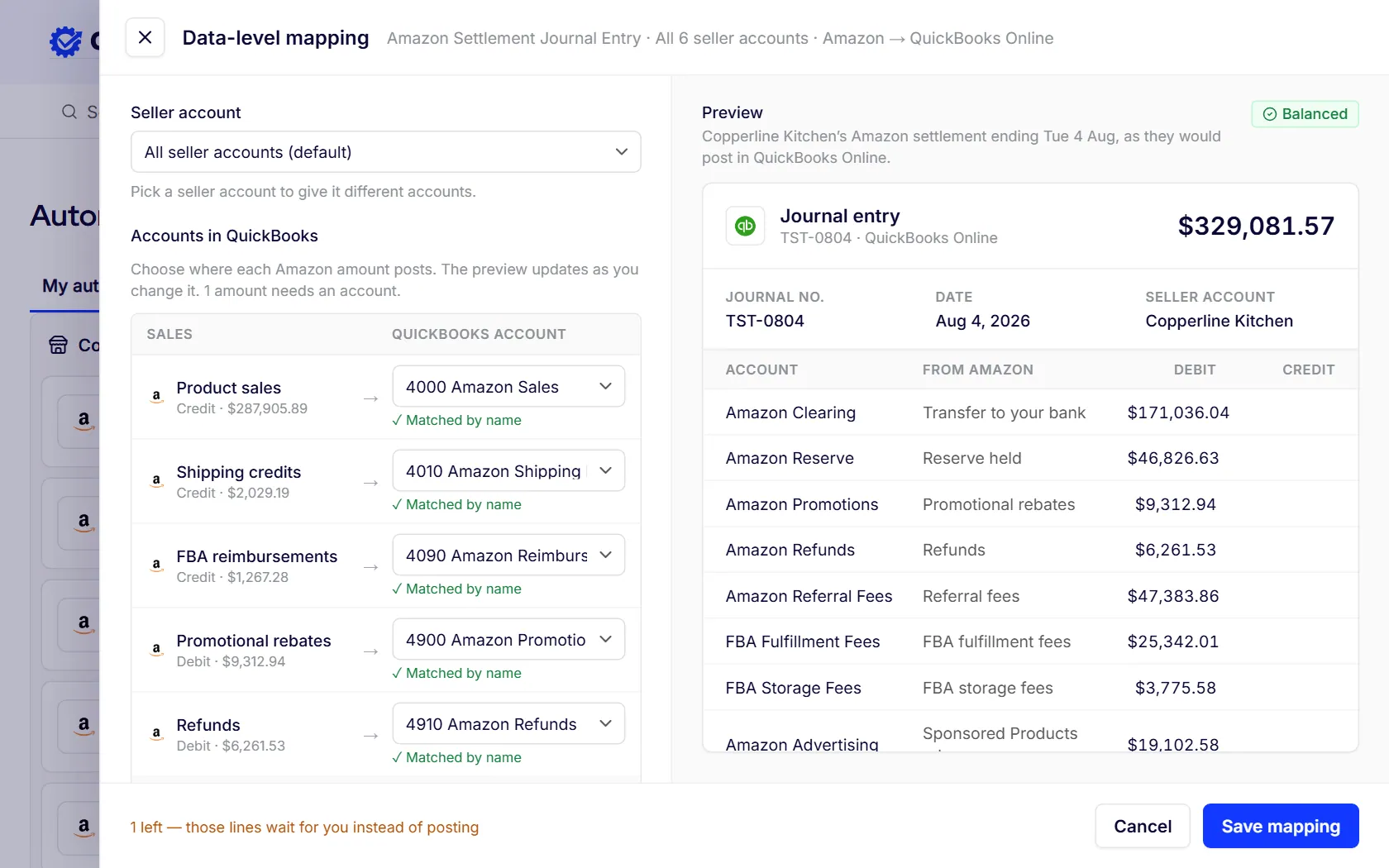
  • One entry per settlement that matches the deposit
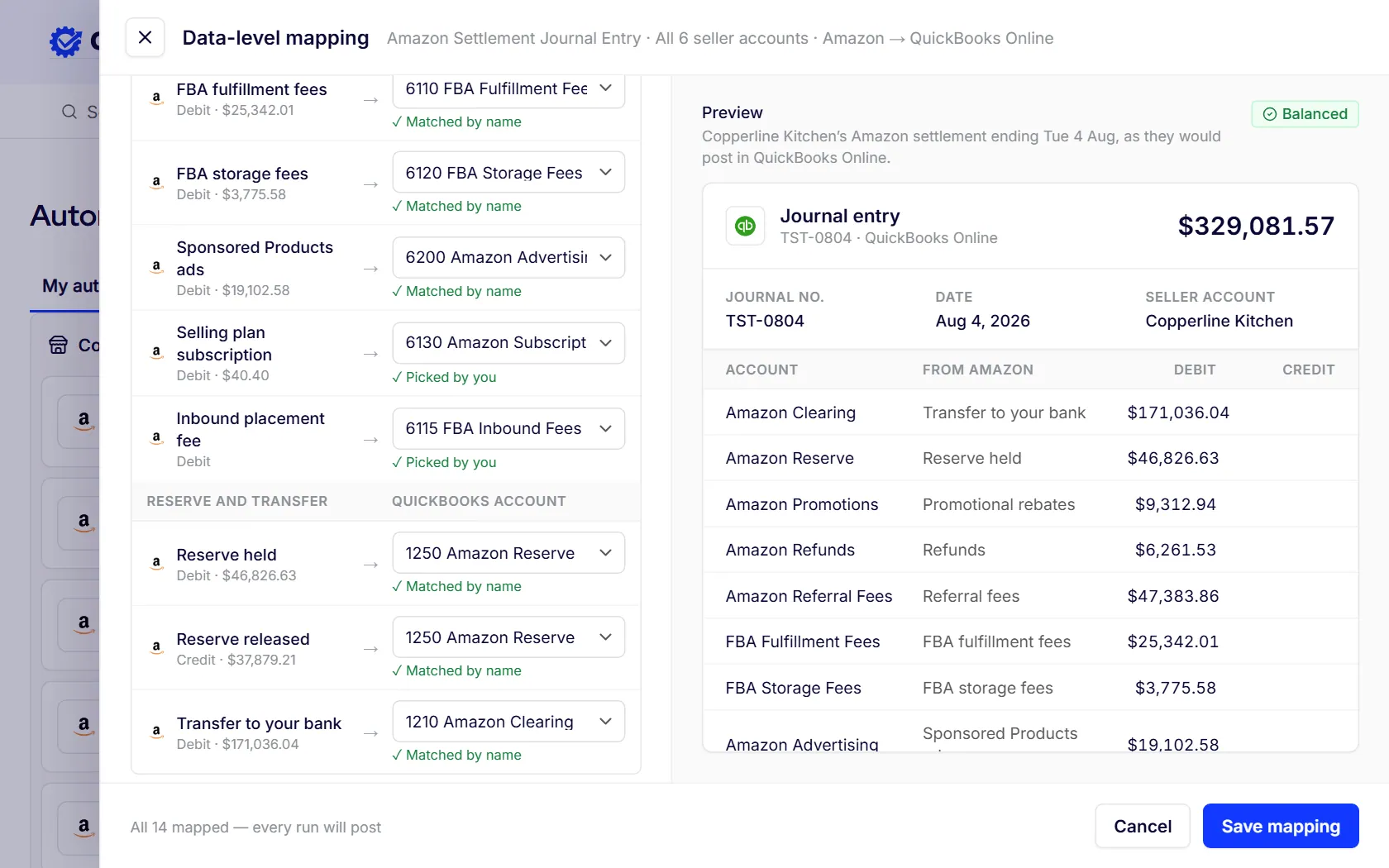
  • Every fee type in its own account
  • Reserves and marketplace tax kept off the P&L
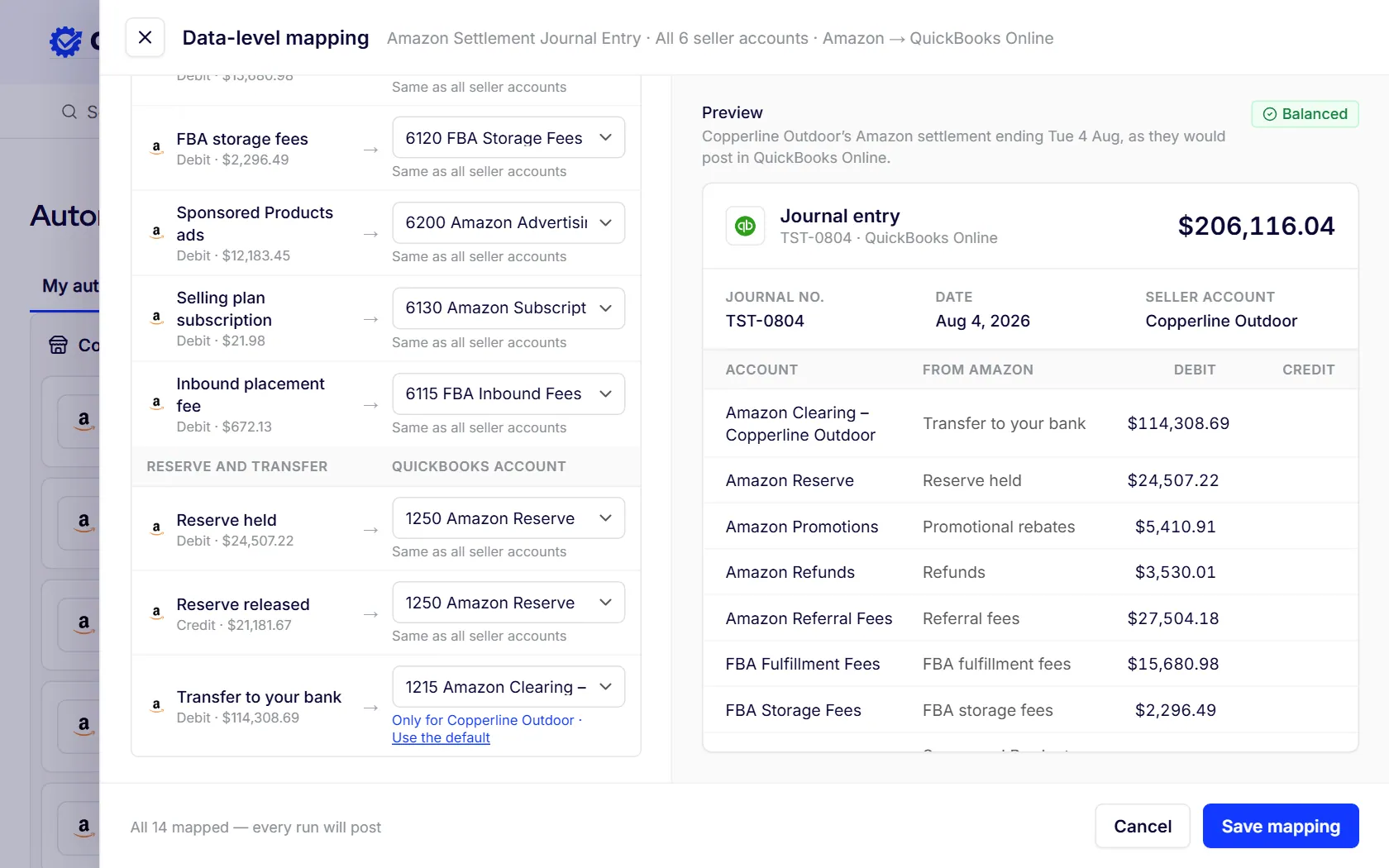
  • Several seller accounts or companies on one mapping template
  • Monitored by Autymate's team after go-live

How Amazon Sales Are Recorded in QuickBooks Online With Autymate

Autymate follows each two-week Amazon settlement line by line, from Seller Central's report to your bank deposit.

Autymate reads each Amazon settlement: 2,420 orders in two weeks, one payout.

Autymate splits every sale into what it really cost you.

Autymate keeps sales tax and reserves off your P&L.

Autymate holds a new Amazon fee for your team. Nothing is guessed.

Autymate posts one entry, matched to the deposit in your bank feed.

How Autymate Posts One Amazon Settlement, Step by Step

Kitchen-appliance brand, FBA in 6 fulfillment centers · one settlement, Oct 25 – Nov 8 · sample figures

  1. Step 1 of 5

    Read the settlement.

    Autymate picks up the settlement period, orders, refunds, fees, reimbursements, reserve lines and the transfer from the Amazon settlement report.

    Replaces: downloading the flat file into a spreadsheet.

Where Each Amazon Settlement Line Goes in QuickBooks

Amazon settlement lines and the QuickBooks Online accounts Autymate posts them to
Amazon settlement lineQuickBooks Online account and account type
Posted to your P&L8 lines
Product sales: FBA product sales, Income
Shipping and gift wrap: Buyer shipping, Shipping income
Promotional rebates: Coupons, Contra-revenue
Refunds: Customer refunds, Contra-revenue, with fee credits returned
Referral and closing fees: Commission, Marketplace fees expense
FBA fees: Storage, inbound placement, removal, Fulfillment or storage expense
Sponsored Products: Ad charges, Advertising expense
Reimbursements and claims: Lost inventory, Other income or inventory adjustment
Kept off your P&L3 lines
Reserve: Held and released, Balance sheet asset
Marketplace tax: Collected and remitted, Clearing, nets to zero
Transfer: Net deposit, Bank, through clearing

Account names are examples. Your accountant's chart of accounts decides the real ones.

Amazon Reserves, DD+7 Holds and Month-End Settlements in QuickBooks

Amazon's money moves on its own schedule. Here is what Autymate does when it does.

When Amazon Holds Your Money

Amazon holds proceeds until seven days after delivery (DD+7) and keeps a reserve each settlement. Autymate posts holds and releases to a reserve account on the balance sheet, never to expenses.

Sample figures

QuickBooks for Amazon Sellers With Several Accounts or Companies

One mapping template for every seller account, brand and company you run.

  • Amazon is rarely the only account or the only channel. Autymate uses one mapping template across all of them, with approved adjustments where an account needs its own rule.

  • Each seller account lands in its own QuickBooks company, or in its own class or location inside one company.

  • Your team reviews every account in one place, without switching companies.

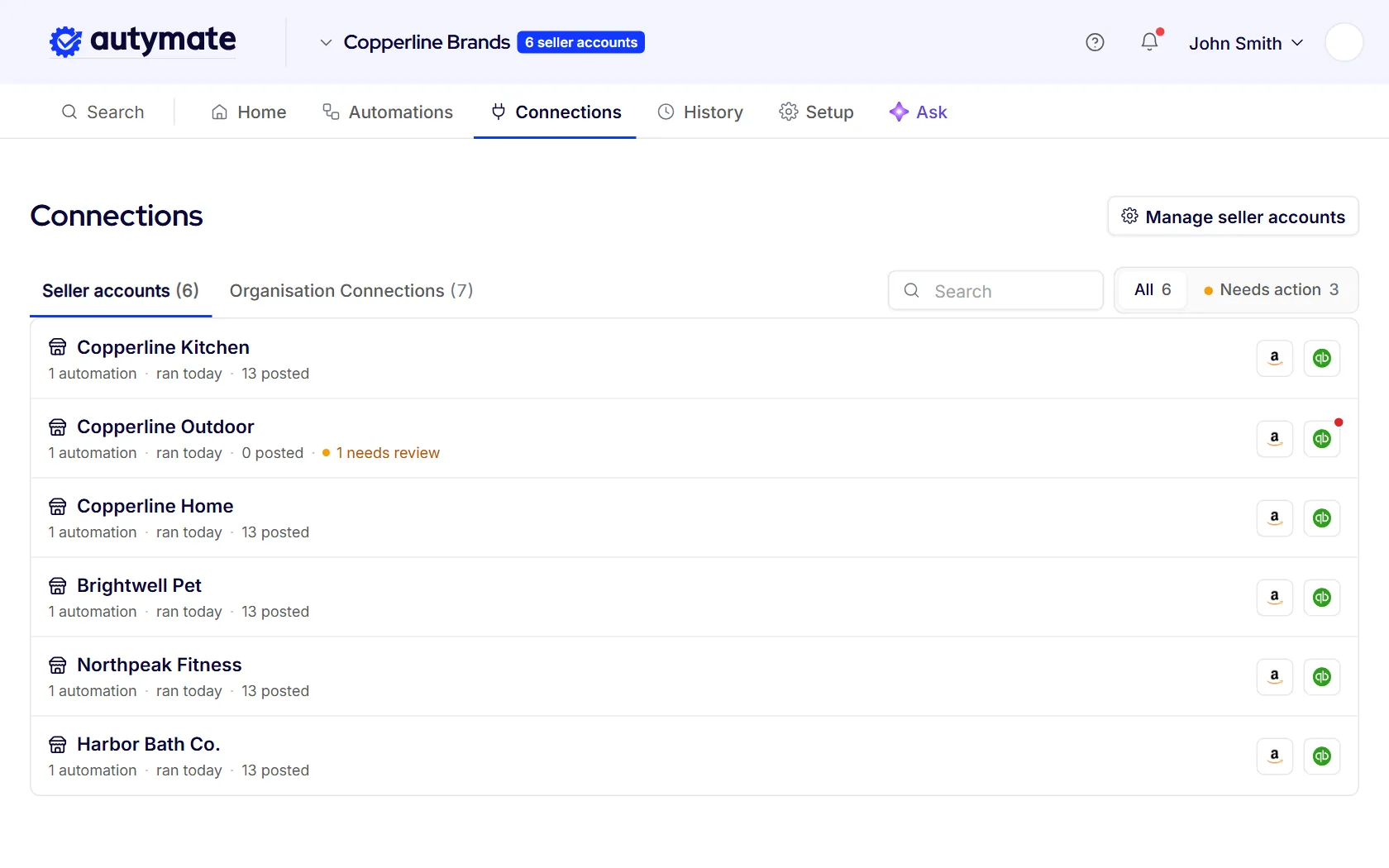
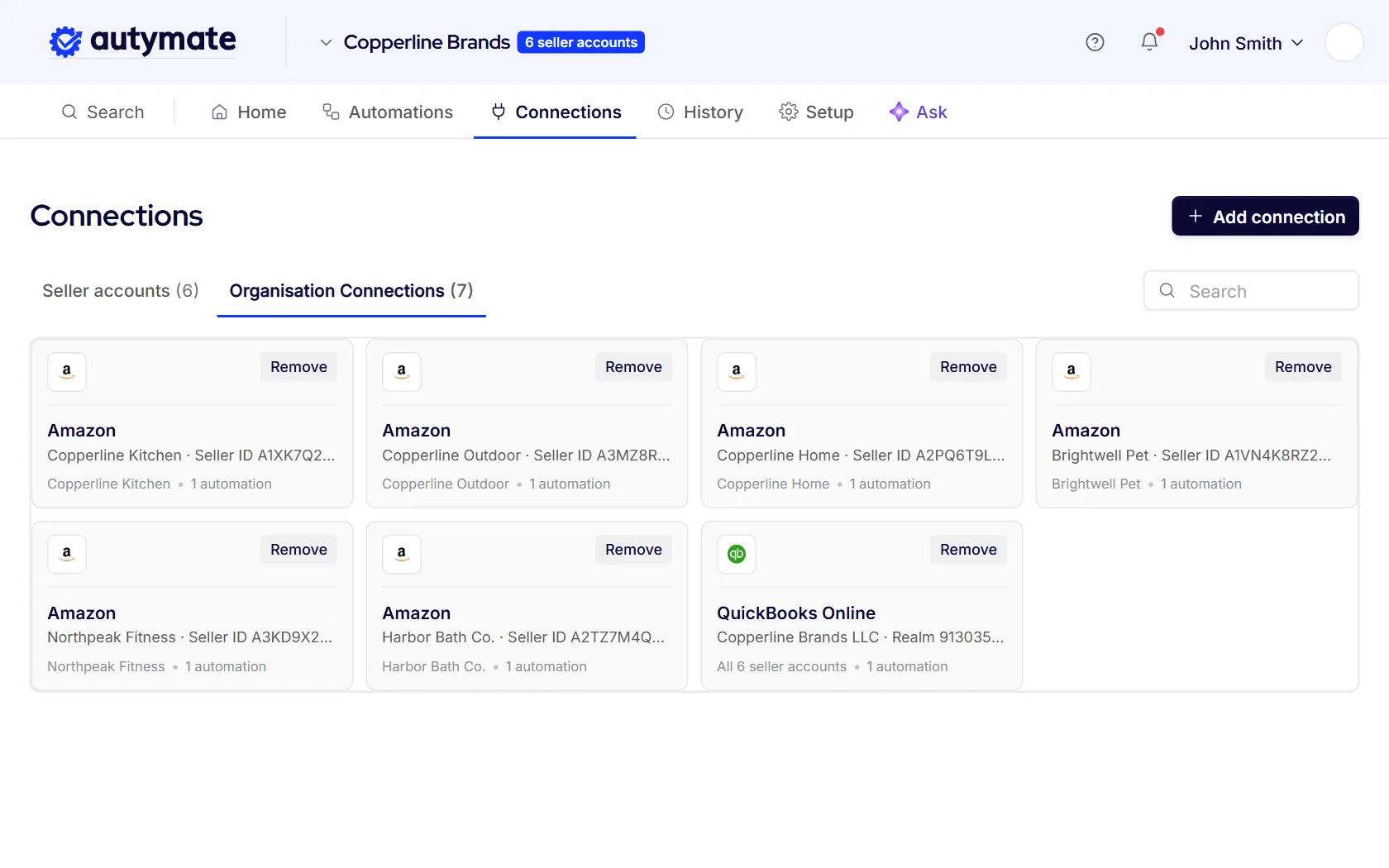
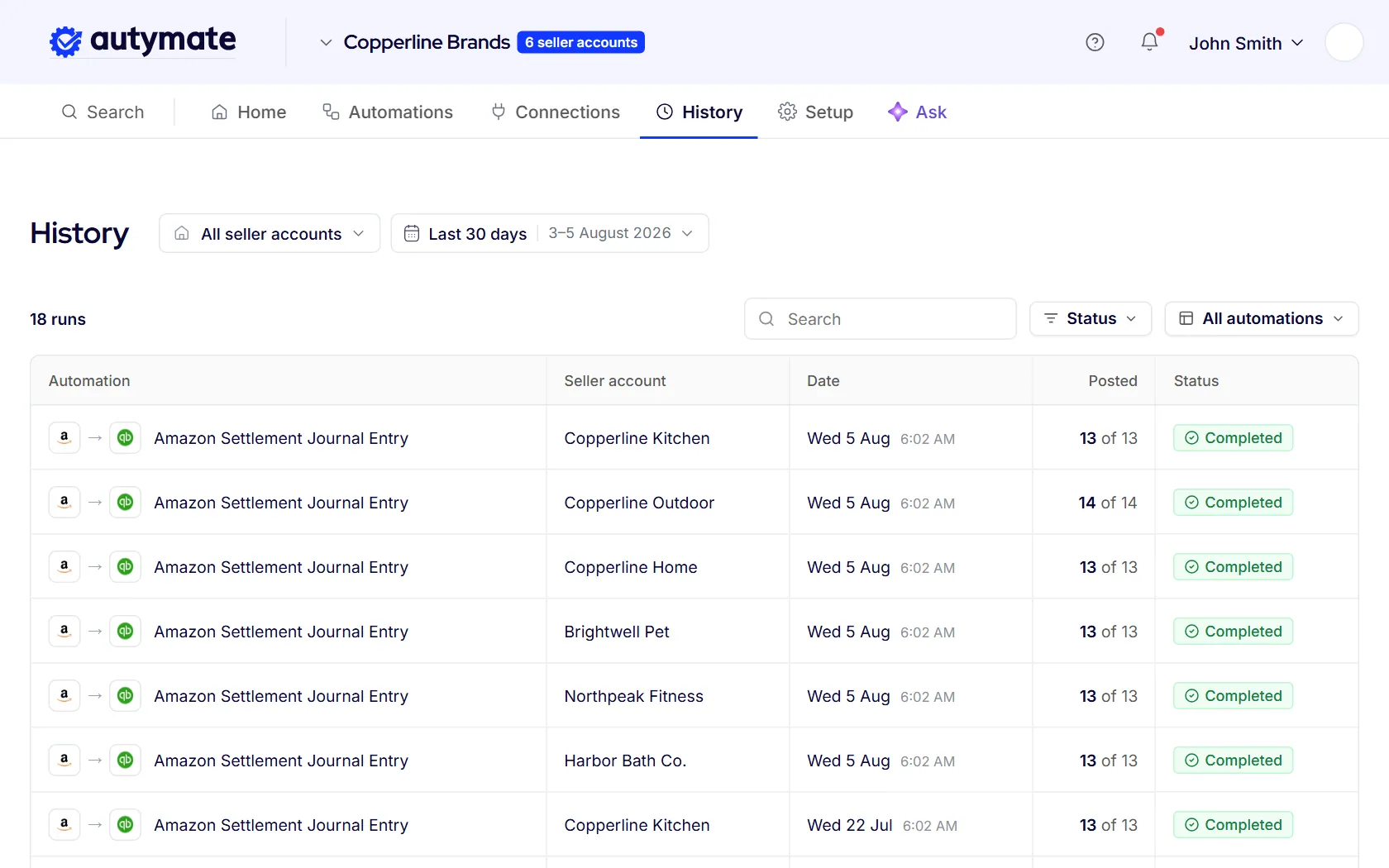
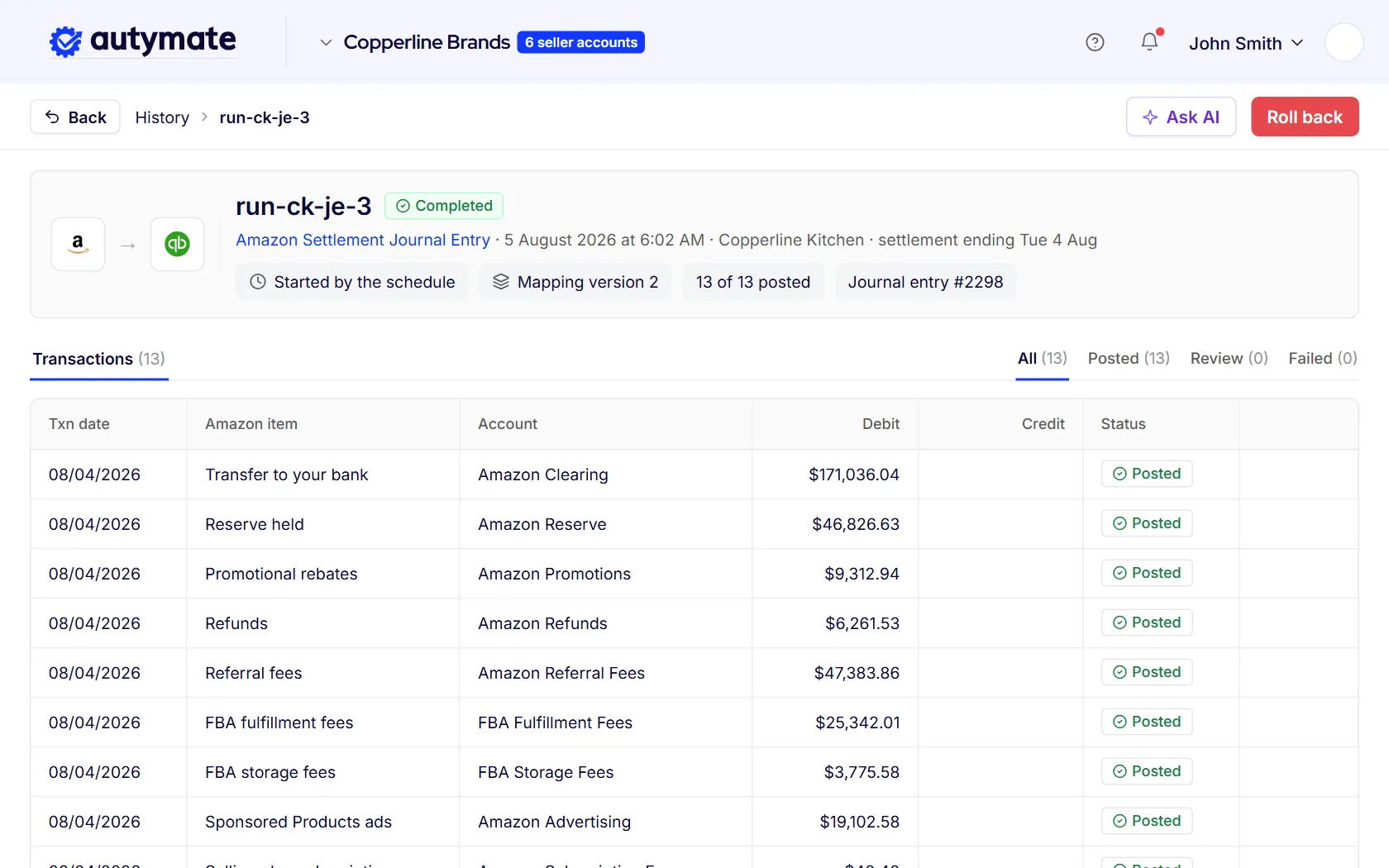
Real Autymate screens, set up by our team for a sample brand group with six Amazon seller accounts. Names and figures are samples.

Six Amazon Seller Accounts in One Autymate Workspace

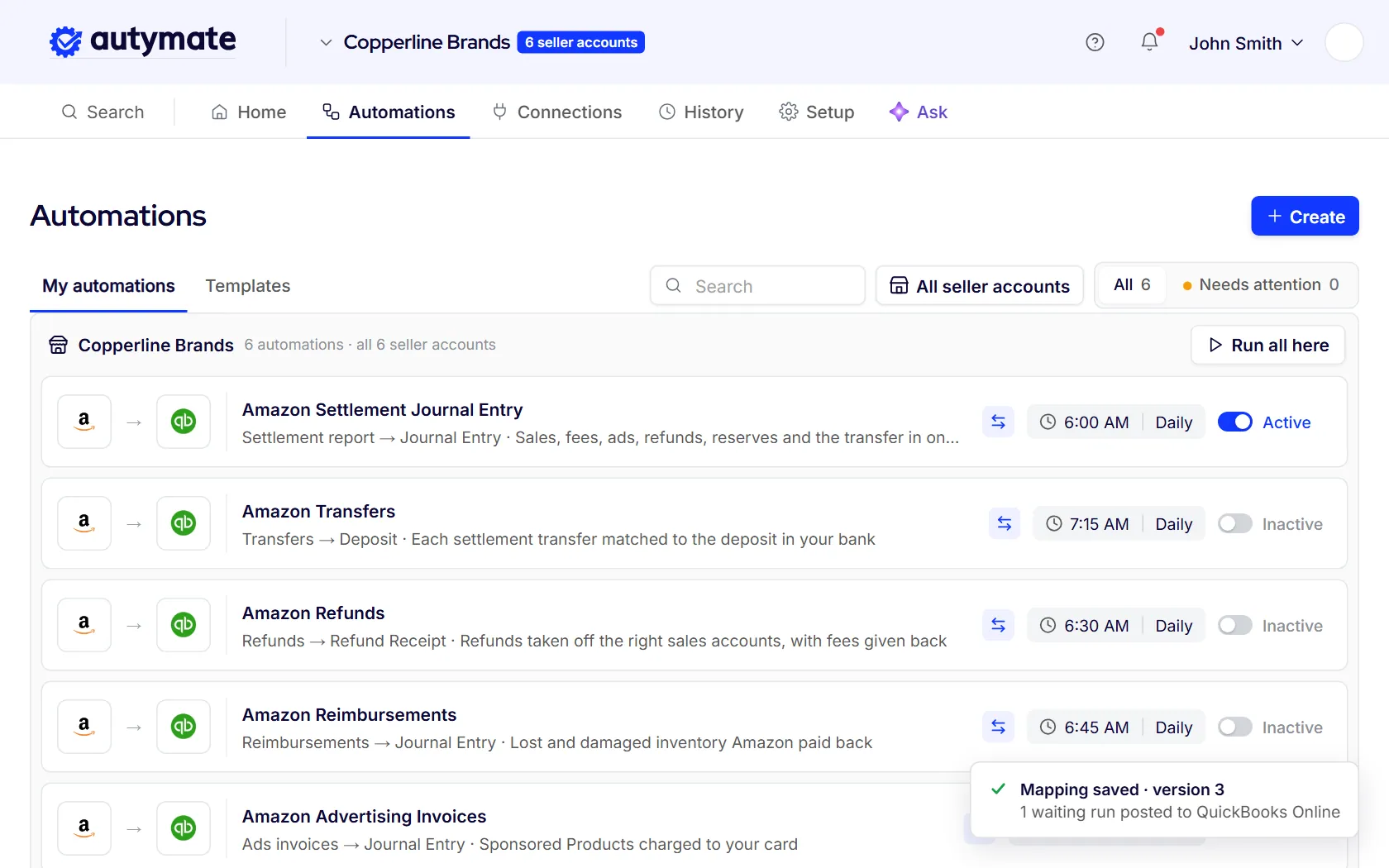
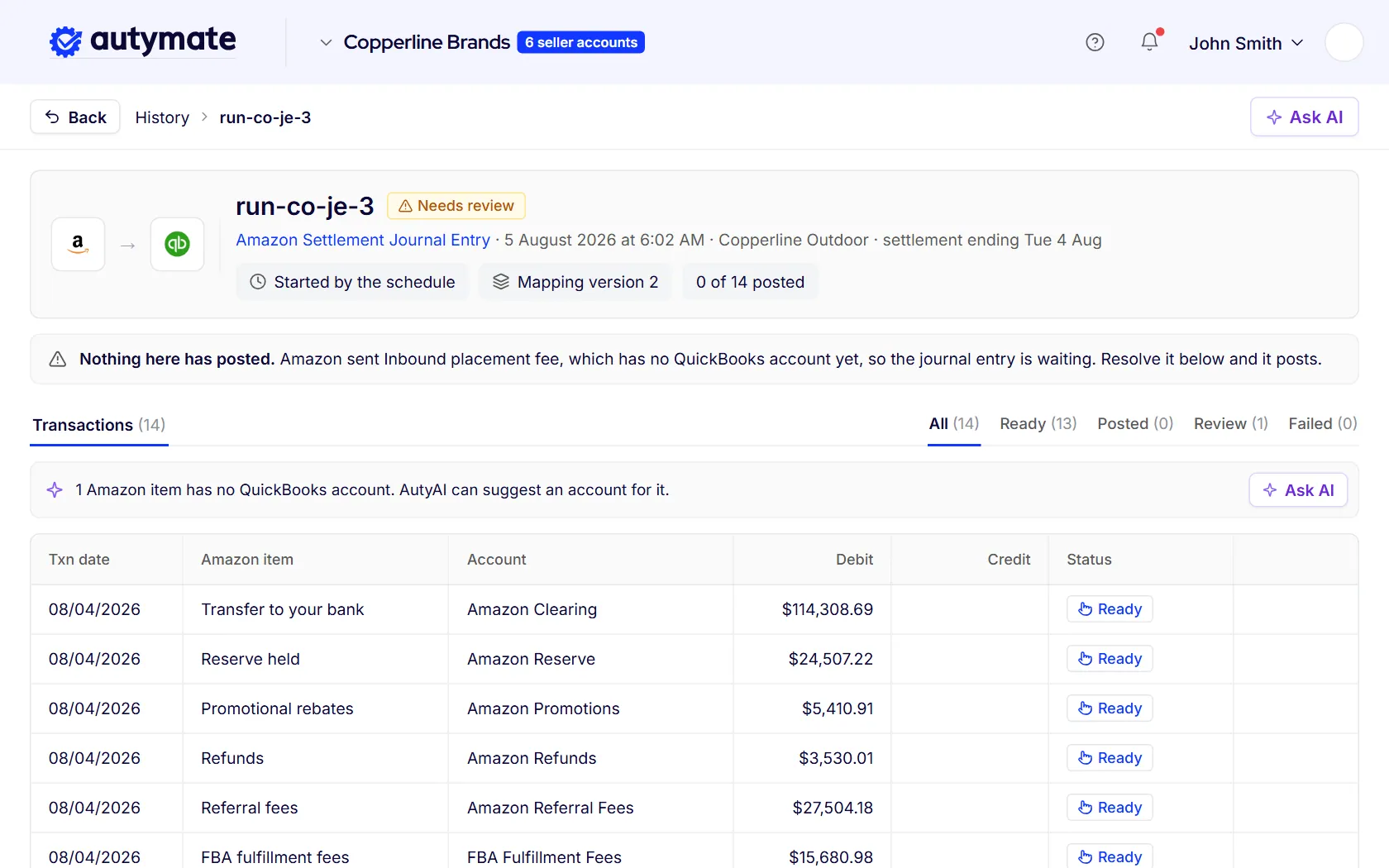
Six Amazon seller accounts, each with its own Seller ID, post to QuickBooks Online. The one waiting on a decision is flagged, so nobody has to go looking.

Every account shares one mapping template. Copperline Outdoor sends its transfer to its own clearing account, and that change applies to that account only.

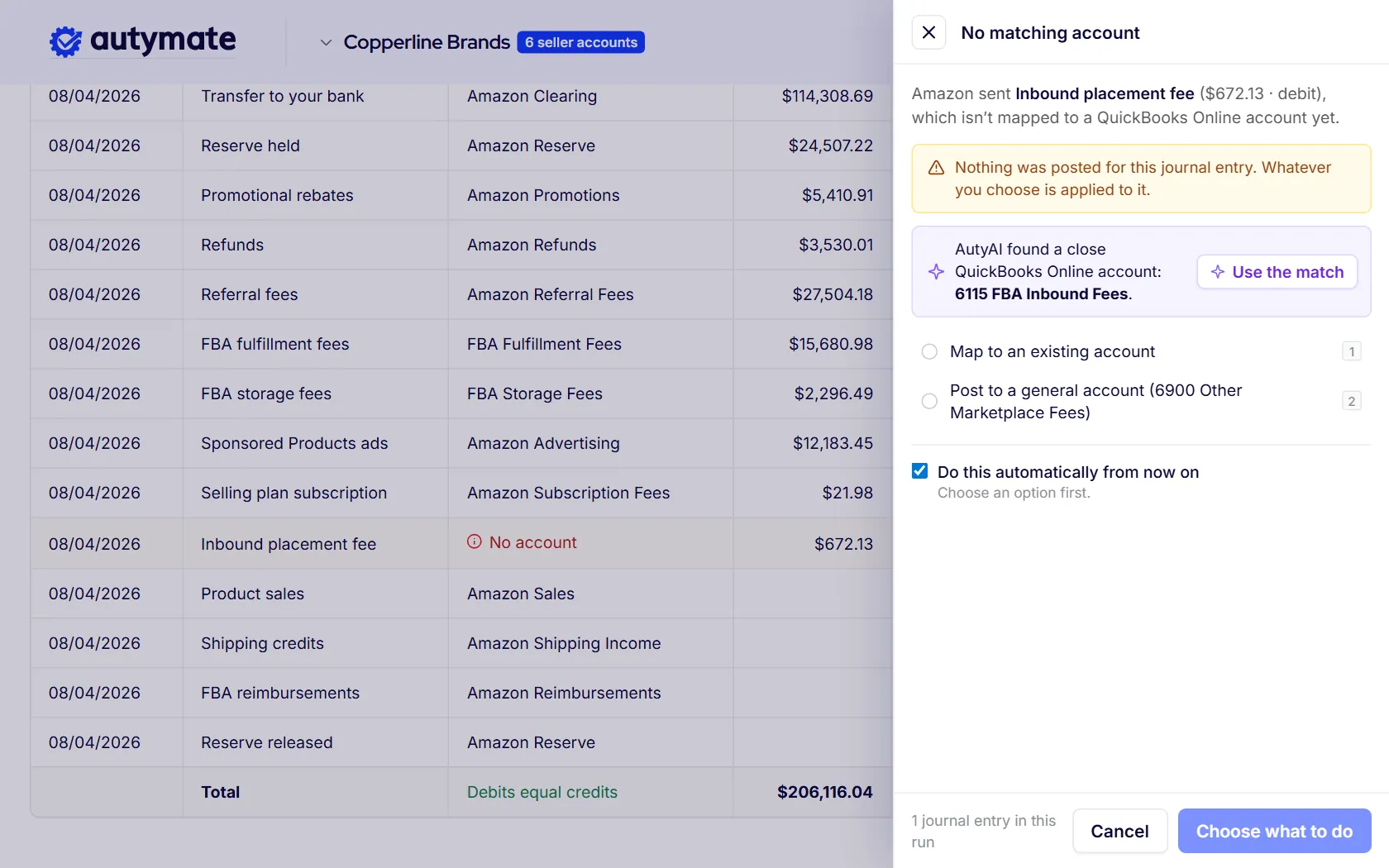
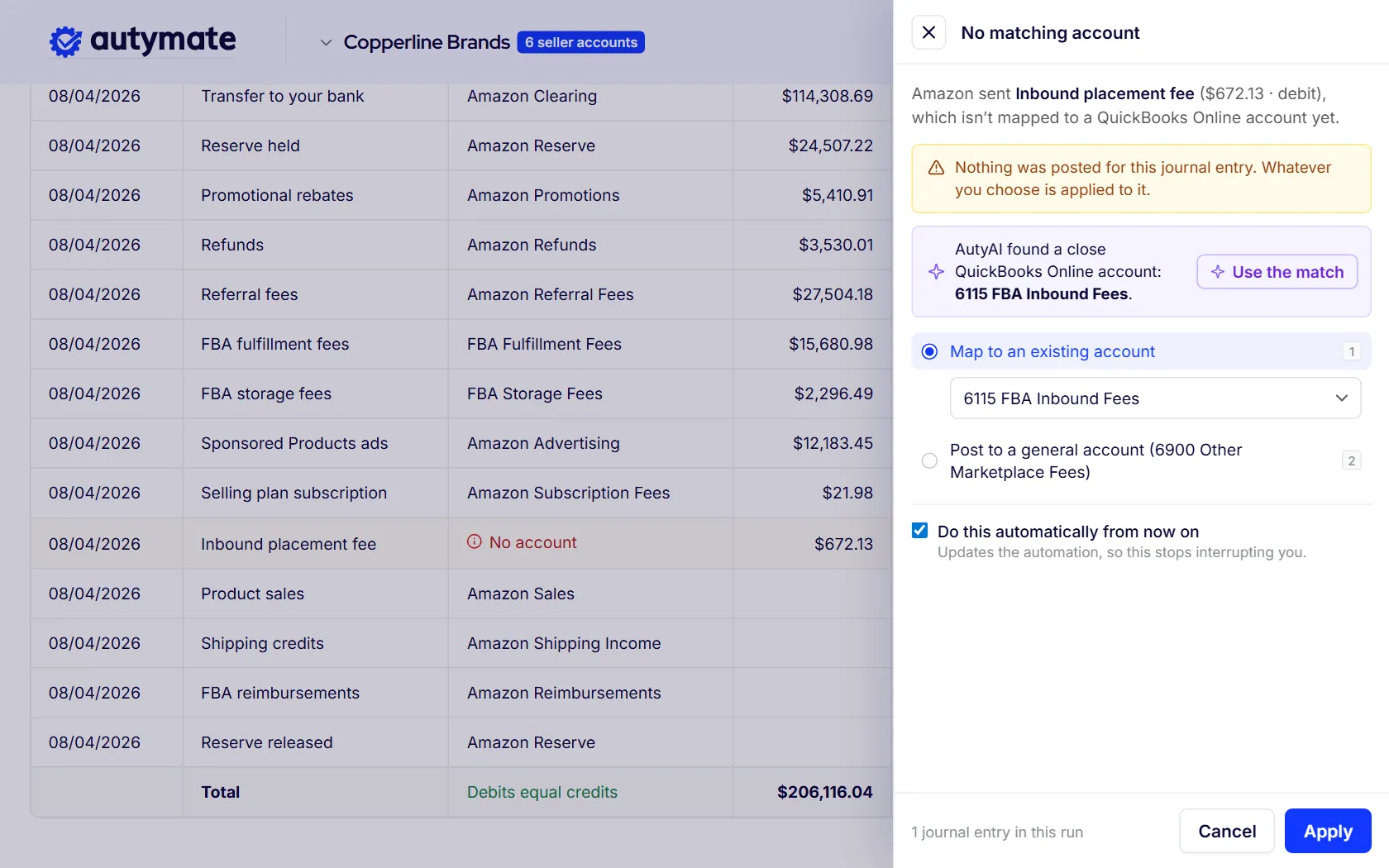
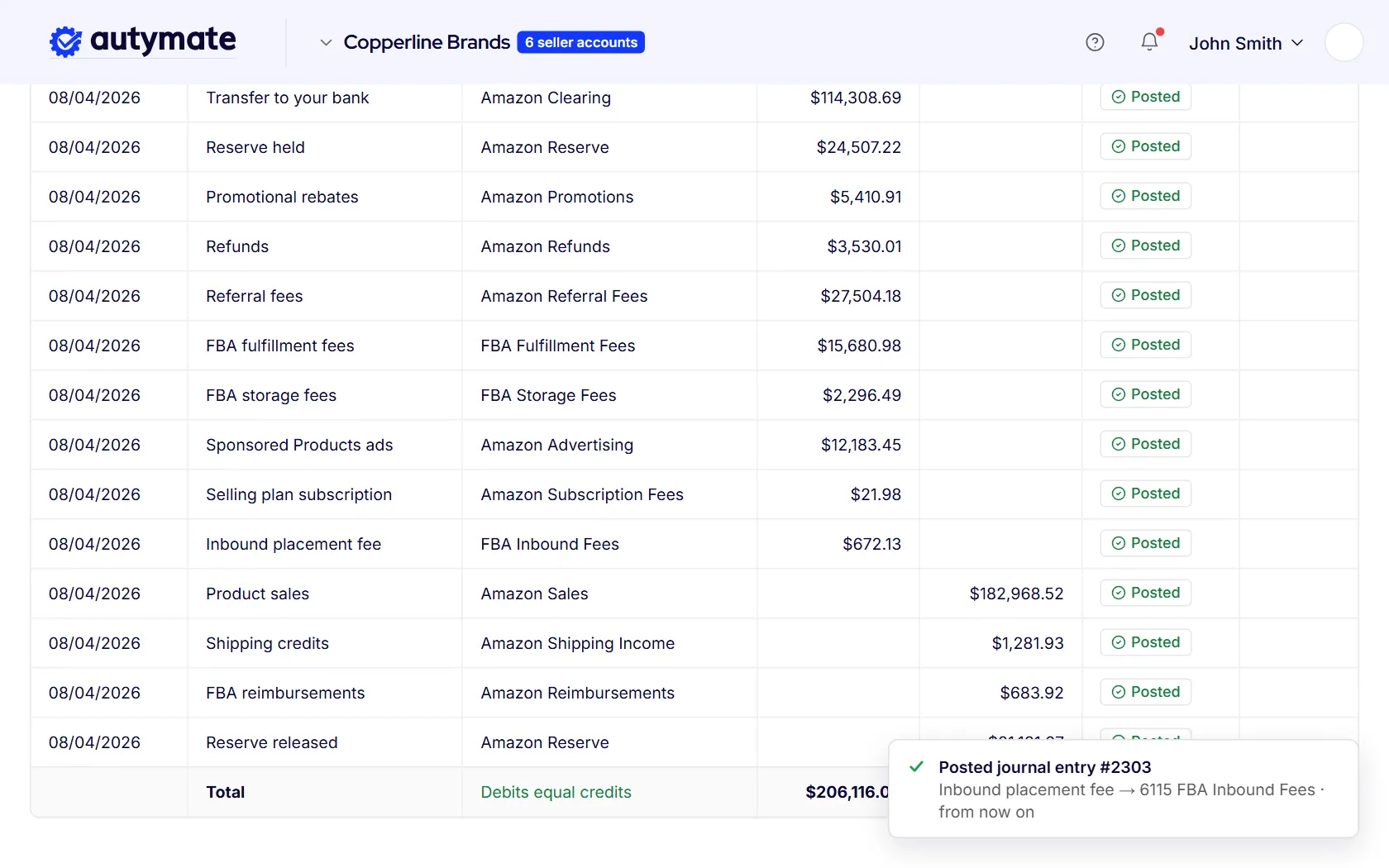
Copperline Outdoor's settlement brought a new fee type. Nothing posted until your team picked the account, and the same fee maps that way from now on.

Each seller account's settlements, with the journal entry, every line and the account it posted to.

Settlement Summary or Order-Level Amazon Posting in QuickBooks

Match the posting design to your order volume and how you reconcile.

  • Settlement Summary

    The usual choice.

    One entry per settlement, split by sales, refunds, fees, reserves and tax.

    One settlement, 2,420 orders: 1 entry, or 2 when it crosses month end.

  • Daily Summary

    One entry per day, cleared against the transfer when it lands.

    One settlement: 14 entries.

  • Order-Level Posting

    One record per Amazon order, for sellers who need order references in QuickBooks.

    One settlement: 2,420 entries.

Trusted by Businesses That Post Into Many QuickBooks Companies

Autymate runs integrations for businesses whose books span many locations and companies.

Minuteman Press

Franchise accounting standardization

franchise locations
900
countries
5
less mundane monthly work
40%

“Their accounting automation and COA standardization solution has streamlined our processes and allowed us to focus on what really matters—growing our business.”

Matt PeretzSVP, Operations & Business Development, Minuteman Press

Read the Minuteman Press story
Intuit App Partner Gold badge

Intuit Gold Partner

Listed on the QuickBooks App Store, with 1,000+ five-star reviews across app stores and Google.

  • QuickBooks App Store4.7out of 5 from 700 ratings

  • Google4.8out of 5 from 415 reviews

Results reported by the named customer; not typical. Reviews quoted as written; each is one user's opinion.

  • “The integration team was great in helping me set up a second location and import the chart of accounts. Very friendly, patient and efficient.”

    ChristineQuickBooks App Store
  • “Autymate was a smooth transition and data appears to be flowing correctly. Great support!”

    DavidRogoffQuickBooks App Store
  • “Always quick to help. Always solves my problem on the first try. Super kind and professional. Autymate makes my life a lot easier!”

    BreeGoogle

Amazon QuickBooks Integration FAQs

How do I connect Amazon Seller Central to QuickBooks Online?

Book a blueprint call. Autymate maps your seller accounts, marketplaces, QuickBooks companies, fee accounts, reserves and tax. You then authorize Seller Central access for each seller account and connect QuickBooks Online. Recent settlements post in test and are checked against their deposits before go-live. After that, each settlement posts automatically and Autymate's team monitors the runs.

Is the QuickBooks Amazon connector free?

Yes. QuickBooks Online includes the Amazon Seller Connector at no extra cost. It brings in each Amazon sale as a sales receipt with its fees and links payouts to bank deposits, which works well for one seller account with simple books. Sellers move to Autymate when they need several accounts or companies, one entry per settlement, reserve and month-end handling, or a team watching the runs.

Why doesn't my Amazon deposit match my sales?

Amazon pays out net. Referral and FBA fees, storage, advertising, refunds and a reserve come out before the transfer, and one settlement covers about two weeks of orders. Posting the settlement split into those parts, with the reserve on the balance sheet, makes the QuickBooks entry match the deposit to the cent.

Can each Amazon seller account post to its own QuickBooks company?

Yes. With Autymate, each Amazon seller account, brand or legal entity posts to its own QuickBooks Online company, or to its own class or location in a shared company. One mapping template covers them all, so a new account starts from the same fee and tax treatment, and your team reviews every account in one place.

Can Amazon, Walmart and eBay post into one QuickBooks company?

Yes. Autymate applies one accounting standard across marketplaces, your own store and your POS. Each channel posts to its own class or location, so QuickBooks shows an Amazon P&L next to Walmart and eBay. QuickBooks' own connectors cover Amazon and eBay but not Walmart, which Autymate builds for your business.

Can a bookkeeping firm run every Amazon client from one place?

Yes. A firm sets up one Amazon mapping template and applies it to each client's QuickBooks company, with client-level adjustments where needed. Every client's held items and run history sit in one review queue, so the team works through exceptions without logging in and out of company files.

Should Amazon-collected sales tax be recorded as revenue?

No. Tax Amazon collects and remits as a marketplace facilitator passes through a clearing account that nets to zero, so it never inflates sales or your tax liability. Confirm your state obligations with your tax advisor.

Why doesn't my Amazon 1099-K match QuickBooks?

The 1099-K reports gross payments for the calendar year, before fees, refunds and reserves, and it counts by transaction date, not settlement date. QuickBooks shows net deposits unless sales are posted at gross. Posting gross sales with fees and refunds as their own lines makes the two reconcile.

Which Amazon report does the integration use: settlement or transactions?

The settlement report. It ties to each bank transfer, so it is the control total for every entry. The Transactions and Date Range reports are useful for analysis, but they don't line up with deposits.

How are Amazon referral and FBA fees recorded in QuickBooks?

Referral fees post to their own marketplace fees account. FBA fulfillment, storage, inbound placement and removal fees post to fulfillment expense, and Sponsored Products to advertising. Revenue stays at gross, and you can see what selling on Amazon really costs.

What if my Sponsored Products ads are charged to a credit card?

By default Amazon deducts ad charges from your seller balance, so they appear in the settlement. If you pay by card instead, the charge reaches QuickBooks through the card feed, and the settlement mapping leaves advertising out so it is never counted twice.

Can Autymate bring in past Amazon settlements?

Yes. Past settlements are posted in a batch once the mapping is approved, and each one is checked against its deposit. How far back depends on what Amazon's reports still hold.

Can I keep using QuickBooks' own Amazon connector alongside Autymate?

Not for the same seller account. Two tools posting the same sales would double count them. Autymate's setup turns the connector off for the accounts it takes over and starts from an agreed date.

Does Autymate work with QuickBooks Desktop for Amazon?

Autymate posts to QuickBooks Online, and one business can run some companies on QuickBooks Online and others on Desktop.

Can cost of goods sold post with Amazon sales?

Where you provide unit costs by SKU, COGS can post beside each settlement's sales.

How much does an Amazon QuickBooks integration cost?

The free QuickBooks connector costs nothing. Settlement tools are priced by monthly order volume. Autymate prices the managed integration by the seller accounts and QuickBooks companies in scope, set out in your blueprint.

Get an Amazon to QuickBooks Integration Blueprint

Autymate sets out how your Amazon sales, fees, refunds, reserves, tax and payouts will appear in QuickBooks Online, before anything is built.

  • Map
  • Validate
  • Prevent duplicates
  • Reconcile
  • Monitor
  • One Seller:

    Your last settlement, posted and matched to its deposit.

  • Several Accounts or Companies:

    One template, each account in its own QuickBooks company.

  • A Bookkeeping Firm:

    Every client's held items in one review queue.

Sources and Method

Sources read November 2026.

  1. Intuit QuickBooks Online help: Connect Amazon Seller Central to QuickBooks Online. Updated Nov 4, 2026.
  2. Intuit QuickBooks Online help: Migrate your Amazon integration. Updated Aug 5, 2026.
  3. Intuit QuickBooks Online help: Connect a sales channel.
  4. Amazon Seller Forums: DD+7 reserve settings from March 12, 2026.
  5. Amazon Seller Central help: Advertising charges.
  6. Amazon Business: QuickBooks integration (purchasing).
  7. Walmart Marketplace Learn: Payment processing.
  8. IRS: Instructions for Form 1099-K.

Figures are sample figures from one sample Amazon settlement, and screens show Autymate on a sample workspace. Your accountant decides your accounting treatment.